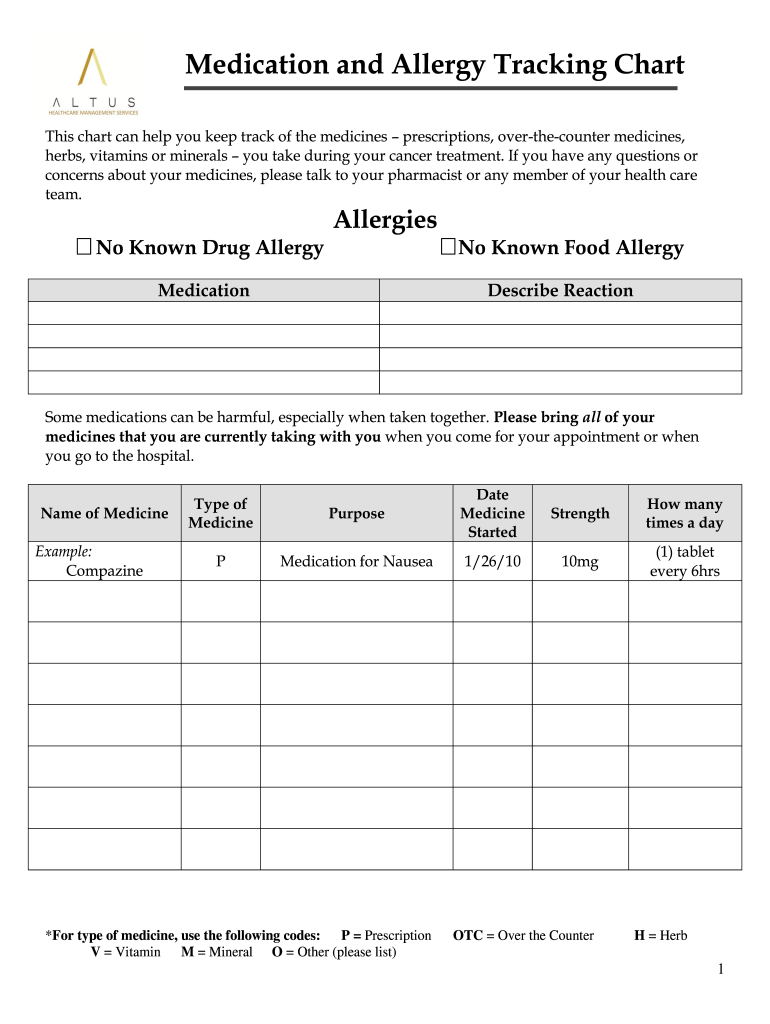
Minerals you take during your cancer treatment. If you have any questions or concerns about your medicines, please talk to your pharmacist or any member of your health care team. Allergies No Known Drug Allergy No Known Food Allergy Medication Describe Reaction Some medications can be harmful, especially when taken together. Please bring all of your medicines that you are currently taking with you when you come for your appointment or when you go to the hospital. Name of Medicine Examp.

Open form follow the instructions

Easily sign the form with your finger

Send filled & signed form or save
How to fill out the Medicine Chart Format online
The Medicine Chart Format is a crucial tool for tracking medications and allergies during cancer treatment. This guide provides clear step-by-step instructions to help you fill out the chart online effectively.
Follow the steps to complete the Medicine Chart Format online.
- Press the ‘Get Form’ button to access the Medicine Chart Format and open it in your preferred editor.
- Begin by reviewing the section labeled ‘Allergies’. Indicate whether you have any known drug or food allergies by selecting the appropriate option.
- Move to the ‘Medication’ section. Here, you will provide details about each medicine you are currently taking. For each medication, fill out the following fields:
- In the ‘Name of Medicine’ field, enter the product name, such as ‘Compazine’. Make sure to spell it correctly.
- Next, select the ‘Type of Medicine’. Use the provided codes: P for prescription, OTC for over-the-counter, V for vitamins, M for minerals, O for other, and H for herbs.
- Enter the ‘Date Medicine Started’. This should be the date when you began taking the medication.
- In the ‘Strength’ field, indicate the dosage, such as ‘10mg’.
- Specify how many times a day you take the medication. For example, you might write ‘1 tablet every 6 hours’.
- Repeat steps 4 to 8 for any additional medications, ensuring you provide all pertinent details for comprehensive tracking.
- Once all sections are completed, you can save your changes, download, print, or share the Medicine Chart Format as needed.
Start completing your Medicine Chart Format online today for better management of your health.
Experience a faster way to fill out and sign forms on the web. Access the most extensive library of templates available.
Related content
May 6, 2021 — Tool, Substance type, Patient age, How tool is administered. Alcohol...
The Cohort Discovery Tool and Chart Review Tool share the same URL, ... If you wish to...
The SOAP note is a method of documentation employed by healthcare providers to write out...
Get answers to your most pressing questions about US Legal Forms API.
How do you adhere to medicine schedule?
Consider using a pill box with a compartment for every day of the week. Some boxes even have compartments for specific times of the day. Keep a medicine calendar and note every time you take a medicine. Consider asking your spouse or someone else to remind you to take your medicines.
How many types of medicine are there?
But most doctors have extra expertise in one type of medicine or another. In fact, there are several hundred medical specialties and subspecialties.
What are the 4 categories of medicine?
General Sales List (GSL) GSLs are a type of medicine that have few legal restrictions. ... Pharmacy Medicines. Pharmacy Medicines are only available to purchase behind the counter at a pharmacy. ... Prescription Only Medicines. ... Controlled Drugs.
How do you organize your medications?
Organize your pills by day. Get into a habit of presorting your pills for the upcoming week(s) by storing them in some sort of pill dispenser or organizer. ... Get a medication app. ... Craft a prescription chart. ... Make a list. ... Be on top of refills. ... Make sure the bottle's label provides adequate information.
How do I set up a medication schedule?
Use a Daily Pill Organizer. mother image/Getty Images. ... Create a Dosing Schedule Chart. ... Make a List of All Your Medications. ... Use a Medication App. ... Check Prescription Labels Often. ... Use a Pill Reminder Gadget or App.
What are the 3 categories of medicines?
The Act defines three categories of medicine: prescription only medicines (POM), which are available only from a pharmacist if prescribed by an appropriate practitioner; pharmacy medicines (P), available only from a pharmacist but without a prescription; and general sales list (GSL) medicines which may be bought from ...
How are medicines classified?
Pharmaceuticals or drugs or medicines are classified in various other groups besides their origin on the basis of pharmacological properties like mode of action and their pharmacological action or activity, such as by chemical properties, mode or route of administration, biological system affected, or therapeutic ...
How do you make a medicine chart?
A medication chart is a form of prescription used to: direct the supply and administration of S4 or S8 medicines in public and private hospitals. direct the supply of S4 or S8 medicines to patients on discharge. record medicines used in the treatment of patients in hospital.
How do you remind a pill?
Create A Routine. Keep It Visible. ... Set An Alarm. Post A Note. ... Use A Pillbox. Flip Pill Bottle Over. ... Carry Extra Doses. Record Each Dose. ... Mobile Medication Reminder Apps **Available on Apple and Android devices. CVS.
How do I keep track of my daily medication?
Make a master list of all your medicines . ... Know what each medicine is for and what side effects to watch for. ... Know when you will run out of each medicine. ... Know what to do if you miss a dose. ... Make sure your medicines aren't expired.
Use professional pre-built templates to fill in and sign documents online faster. Get access to thousands of forms.
If you believe that this page should be taken down, please follow our DMCA take down process here.