Loading
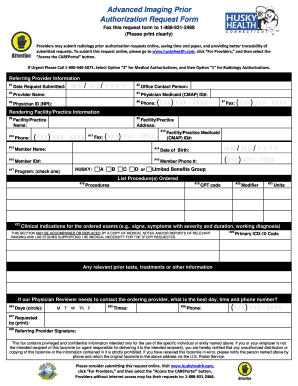
Get Husky - Advanced Imaging Prior Authorization Request Form - Huskyhealthct
How it works
-

Open form follow the instructions
-

Easily sign the form with your finger
-

Send filled & signed form or save
How to fill out the HUSKY - Advanced Imaging Prior Authorization Request Form - Huskyhealthct online
Filling out the HUSKY - Advanced Imaging Prior Authorization Request Form online is a straightforward process. This guide provides step-by-step instructions to help you navigate the form and ensure all necessary information is included for a successful submission.
Follow the steps to complete the prior authorization request form
- Click ‘Get Form’ button to obtain the form and open it in the editor.
- Enter the date the request is being submitted in MM/DD/YYYY format.
- Provide the name of the office contact person, specifying the individual responsible for the submission.
- Complete the provider name field with the referring or ordering provider's first and last name.
- Insert the referring/ordering provider's Medicaid (CMAP) ID.
- Fill in the NPI (National Provider Identifier) for the physician providing the services.
- Enter the office phone number of the referring/ordering provider.
- Include the office fax number of the referring/ordering provider.
- State the name of the rendering facility or practice where the procedure will take place.
- Input the address of the rendering facility or practice.
- Provide the phone number for the rendering facility or practice.
- Include the fax number for the rendering facility or practice.
- If available, insert the facility/practice Medicaid (CMAP) ID.
- Input the member's name for whom the procedure is being requested.
- Enter the member's date of birth in MM/DD/YYYY format.
- Fill in the member's Medicaid ID number.
- Provide the best contact phone number for the member.
- Select the appropriate program under which the member is covered by checking one box.
- Describe the procedures being requested in detail.
- Include the CPT code associated with the requested procedure or procedures.
- Specify any modifiers relevant to the procedure requested.
- Indicate the number of units requested for the procedure.
- Input the clinical indications for the ordered exams, providing supporting medical necessity if applicable.
- State the primary ICD-10 code for the member.
- Circle the best days to reach the referring physician from the designated options.
- Provide the best times to reach the referring physician.
- Enter the phone number where the referring physician can be contacted.
- Print and sign the document with the referring provider's name and signature.
- Once completed, save changes, download, print, or share the form as needed.
Don't delay—complete your prior authorization request online today.
The prior authorization process begins when a service prescribed by a patient's physician is not covered by their health insurance plan. Communication between the physician's office and the insurance company is necessary to handle the prior authorization.