Loading
Form preview
  • US Legal Forms
  • Other Templates
  • More Forms
  • More Multi-State Forms
  • Ne Marriage Worksheet 2020

Get Ne Marriage Worksheet 2020-2026

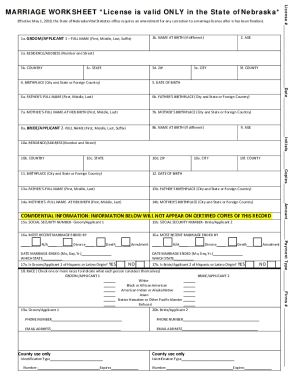
Effective May 1, 2019, the State of Nebraska Vital Statistics office requires an amendment for any correction to a marriage license after is having been finalized.1a. GROOM/APPLICANT 1 FULL NAME (First,.

How it works

  1. Open form

    Open form follow the instructions

  2. Easily sign form

    Easily sign the form with your finger

  3. Share form

    Send filled & signed form or save

How to fill out the NE Marriage Worksheet online

Completing the NE Marriage Worksheet is an essential step in the marriage application process in Nebraska. This guide will walk you through the online form, providing clear instructions for each section to ensure you fill out the necessary information accurately and efficiently.

Follow the steps to complete your NE Marriage Worksheet online.

  1. Click ‘Get Form’ button to obtain the form and open it for editing.
  2. Begin completing the form by entering the full name of Groom/Applicant 1, including any suffix, in the designated field.
  3. If Groom/Applicant 1 has a different name at birth, include that information in the next field.
  4. Enter the age of Groom/Applicant 1 in the appropriate section.
  5. Fill out the zip code for Groom/Applicant 1’s residence.
  6. Indicate the county of residence for Groom/Applicant 1.
  7. Provide the marriage license number in the specified field.
  8. Complete the residence address for Groom/Applicant 1, ensuring to include street number and name.
  9. Specify the country and state of residence for Groom/Applicant 1.
  10. Enter the city of residence for Groom/Applicant 1.
  11. Input the date of birth for Groom/Applicant 1.
  12. Fill in the full name and birthplace of Groom/Applicant 1's father.
  13. Provide the full name and birthplace of Groom/Applicant 1’s mother at her birth.
  14. Repeat steps 2-13 for Bride/Applicant 2, ensuring to accurately fill out each corresponding field.
  15. Complete the confidential section including both applicants' Social Security numbers.
  16. Indicate the status of the most recent marriage for both applicants and provide the necessary details.
  17. Answer the questions regarding Hispanic or Latino origin for both applicants.
  18. Select the race options that apply to each applicant in the designated sections.
  19. Ensure all contact information, including phone numbers and email addresses, are entered correctly.
  20. Finally, after reviewing all entered information, save your changes, download the form, print it, or share it as required.

Begin filling out your NE Marriage Worksheet online today to prepare for your marriage application.

Get form

Experience a faster way to fill out and sign forms on the web. Access the most extensive library of templates available.
Get form

Related content

Marriage Worksheet
State of Nebraska - Department of Health and Human Services - VITAL RECORDS. MARRIAGE...
Learn more
(PDF) worksheet-1-introduction.pdf | Kayreen T . H...
FAMILY LAW TUTOR'S WORKSHEET ACADEMIC YEAR 2015-2016 Name of Student: Ms. Amrita ... The...
Learn more
2016 Instruction 1040 - IRS
Dec 15, 2016 — marriage, divorce, etc., be sure to report the change to the Social...
Learn more

Related links form

Wisconsin Realtors Association Rental Application Citizens Bank Subordination 2020 Tabe Test Form 9 Level D Answer Key Reading 2020 Volunteer Application Form - St. Francis House - Puyallupfrancishouse 2020

Questions & Answers

Get answers to your most pressing questions about US Legal Forms API.

Contact support

Name Change After Marriage In order to legally alter a surname in Nebraska, you just need to indicate the name change on your marriage license application and submit the application seven (7) to thirty (30) days in advance of your wedding date.

Can my partner and I get married the same day we get our marriage license? Yes. There is no waiting period in Nebraska. This means that the marriage license is immediately valid once it is issued.

Go to the Douglas County Clerk's Office located in Room H08 on the Harney Level of the Omaha-Douglas Civic Center, 1819 Farnam Street, Omaha, NE 68183. Each applicant must present a non-expired, valid government-issued ID - IMPORTANT. If proof of identity/age is not furnished, the license cannot be issued.

There are no residency or blood test requirements in Nebraska.

In Nebraska all wedding officiants must be at least 18 years old to be able to legally solemnize marriage. Basically, in addition to being an ordained minister, you must also be a legal adult.

Identification: A driver's license, state ID card or passport for each person must be presented at the time of application. Identification must include a photo of the applicant. IDs must also be current and non-expired. Fee: The marriage license fee is $25.

If you are not able to find your license, you can call us at 402-444-6080, or email us at marriage@douglascounty-ne.gov, and we will check to make sure your license is on file in our office. Only marriage licenses between 1988 to present are online.

Couples must show proof of identity through a non-expired driver's license, passport, green card or birth certificate. Birth certificates used for proof of identity purposes must be certified copies. Couples are also required to complete the marriage license application for the County Clerk and pay the application fee.

Get This Form Now!

Use professional pre-built templates to fill in and sign documents online faster. Get access to thousands of forms.
Get form
If you believe that this page should be taken down, please follow our DMCA take down processhere.
Get NE Marriage Worksheet
Get form
  • Adoption
  • Bankruptcy
  • Contractors
  • Divorce
  • Home Sales
  • Employment
  • Identity Theft
  • Incorporation
  • Landlord Tenant
  • Living Trust
  • Name Change
  • Personal Planning
  • Small Business
  • Wills & Estates
  • Packages A-Z
  • Affidavits
  • Bankruptcy
  • Bill of Sale
  • Corporate - LLC
  • Divorce
  • Employment
  • Identity Theft
  • Internet Technology
  • Landlord Tenant
  • Living Wills
  • Name Change
  • Power of Attorney
  • Real Estate
  • Small Estates
  • Wills
  • All Forms
  • Forms A-Z
  • Other Templates
  • Legal Hub
  • About Us
  • Help Portal
  • Legal Resources
  • Blog
  • Affiliates
  • Contact Us
  • Delete My Account
  • Site Map
  • Industries
  • Forms in Spanish
  • Localized Forms
  • State-specific Forms
  • Forms Kit
  • Real Estate Handbook
  • All Guides
  • Notarize
  • Incorporation services
  • For Consumers
  • For Small Business
  • For Attorneys
  • USLegal
  • FormsPass
  • pdfFiller
  • signNow
  • altaFlow
  • DocHub
  • Instapage
Form Packages
  • Adoption
  • Bankruptcy
  • Contractors
  • Divorce
  • Home Sales
  • Employment
  • Identity Theft
  • Incorporation
  • Landlord Tenant
  • Living Trust
  • Name Change
  • Personal Planning
  • Small Business
  • Wills & Estates
  • Packages A-Z
Form Categories
  • Affidavits
  • Bankruptcy
  • Bill of Sale
  • Corporate - LLC
  • Divorce
  • Employment
  • Identity Theft
  • Internet Technology
  • Landlord Tenant
  • Living Wills
  • Name Change
  • Power of Attorney
  • Real Estate
  • Small Estates
  • Wills
  • All Forms
  • Forms A-Z
  • Other Templates
Customer Service
  • Legal Hub
  • About Us
  • Help Portal
  • Legal Resources
  • Blog
  • Affiliates
  • Contact Us
  • Delete My Account
  • Site Map
  • Industries
  • Forms in Spanish
  • Localized Forms
  • State-specific Forms
  • Forms Kit
Legal Guides
  • Real Estate Handbook
  • All Guides
Prepared for you
  • Notarize
  • Incorporation services
Our Customers
  • For Consumers
  • For Small Business
  • For Attorneys
Our Sites
  • USLegal
  • FormsPass
  • pdfFiller
  • signNow
  • altaFlow
  • DocHub
  • Instapage
Social Media
Call us now toll free:
+1 833 426 79 33
As seen in:
© Copyright 1999-2026 airSlate Legal Forms, Inc. 17 Station Street, Ste. 203, Brookline, MA 02445
  • Your Privacy Choices
  • Terms of Service
  • Privacy Notice
  • Content Takedown Policy
  • Bug Bounty Program