Loading
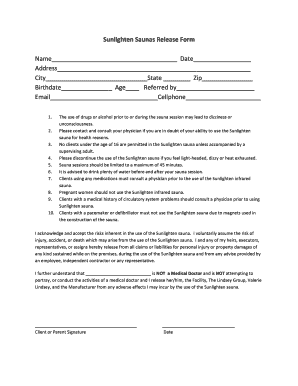
Get Sunlighten Saunas Release Form - The Lindsey Group Massage
How it works
-

Open form follow the instructions
-

Easily sign the form with your finger
-

Send filled & signed form or save
How to fill out the Sunlighten Saunas Release Form - The Lindsey Group Massage online
Filling out the Sunlighten Saunas Release Form is an important step for users wishing to experience the benefits of the sauna. This guide will provide clear instructions to help you complete the form accurately and efficiently.
Follow the steps to complete the release form online.
- Press the ‘Get Form’ button to access the release form and open it in your preferred digital format.
- Begin by filling in the 'Name' field with your full name as it appears on your identification.
- Next, input the 'Date' on which you are completing the form.
- Provide your full 'Address,' ensuring to include your street number, street name, and any apartment or unit number if applicable.
- In the 'City' field, enter the name of the city where you reside.
- Specify your 'State' by selecting the appropriate abbreviation.
- Fill in your 'Zip' code accurately for your residence.
- Indicate your 'Birthdate' in the format requested, usually standard as MM/DD/YYYY.
- Record your 'Age' at the time of filling out the form.
- If you were referred by someone, please write their name in the designated 'Referred by' section.
- Complete the 'Email' and 'Cellphone' fields with your current contact information to ensure proper communication.
- Finally, review all filled information for accuracy. Once confirmed, you may save any changes, download the form, print it for your records, or share it as needed.
Complete your Sunlighten Saunas Release Form online today to ensure a smooth and enjoyable sauna experience.
Aaron Zack - CEO - Sunlighten | LinkedIn.