Loading
Form preview
  • US Legal Forms
  • Other Templates
  • More Forms
  • More Multi-State Forms
  • Oh Public Assistance Damage Assessment Jurisdictional Tracking Form - Warren County

Get Oh Public Assistance Damage Assessment Jurisdictional Tracking Form - Warren County

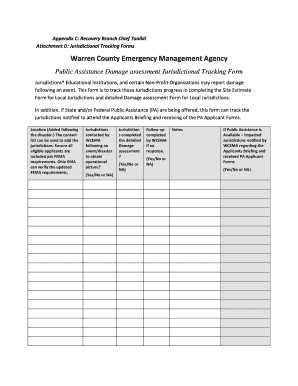
Appendix C: Recovery Branch Chief Toolkit Attachment D: Jurisdictional Tracking FormsWarren County Emergency Management Agency Public Assistance Damage assessment Jurisdictional Tracking Form Jurisdictions*.

How it works

  1. Open form

    Open form follow the instructions

  2. Easily sign form

    Easily sign the form with your finger

  3. Share form

    Send filled & signed form or save

How to fill out the OH Public Assistance Damage Assessment Jurisdictional Tracking Form - Warren County online

This guide provides clear, step-by-step instructions on how to complete the OH Public Assistance Damage Assessment Jurisdictional Tracking Form for Warren County online. Whether you are a user with minimal experience or looking for a refresh, this comprehensive approach will help you navigate the form with ease.

Follow the steps to complete the form accurately and efficiently.

  1. Press the ‘Get Form’ button to access the form and open it in your chosen editor.
  2. In the 'Jurisdictions' section, list all educational institutions and non-profit organizations that are reporting damage following the event. Be sure to include all eligible applicants as per FEMA requirements.
  3. Indicate whether the jurisdictions have been contacted by the Warren County Emergency Management Agency (WCEMA) following the disaster to obtain an operational picture. Mark 'Yes', 'No', or 'NA' for this field.
  4. Document whether each jurisdiction has completed the detailed damage assessment by marking 'Yes', 'No', or 'NA'. This will help in tracking the progress.
  5. Record any follow-up actions taken by WCEMA if there was no response from a jurisdiction. Again, respond with 'Yes', 'No', or 'NA'.
  6. Use the 'Notes' section to provide any additional comments or information relevant to the jurisdictions and their responses.
  7. If public assistance is available, indicate whether impacted jurisdictions were notified by WCEMA regarding the Applicants Briefing and received PA Applicant Forms by marking 'Yes', 'No', or 'NA'.
  8. After filling in all required fields, you can save changes, download, print, or share the completed form to ensure submission to the relevant authorities.

Complete the OH Public Assistance Damage Assessment Jurisdictional Tracking Form online to ensure a smooth process.

Get form

Experience a faster way to fill out and sign forms on the web. Access the most extensive library of templates available.
Get form

Related content

Important Forms - Emergency Management
Important Forms · NOTE: In order to receive funding related to your FEMA Public...
Learn more
ICS Form 209, Incident Status Summary - FEMA...
Damage Assessment Information (summarize ... Strategic Objectives (define planned...
Learn more
Operational Templates and Guidance for EMS Mass...
Emergency Medical Services (EMS) agencies regardless of service delivery model have sought...
Learn more

Related links form

Csio Cancellation Form 2020 Diabetes Assessment Form 2020 School Of Gymnastics Registration Form - Danik Gym Doh4495 Form

Get This Form Now!

Use professional pre-built templates to fill in and sign documents online faster. Get access to thousands of forms.
Get form
If you believe that this page should be taken down, please follow our DMCA take down processhere.
Get OH Public Assistance Damage Assessment Jurisdictional Tracking Form - Warren County
Get form
  • Adoption
  • Bankruptcy
  • Contractors
  • Divorce
  • Home Sales
  • Employment
  • Identity Theft
  • Incorporation
  • Landlord Tenant
  • Living Trust
  • Name Change
  • Personal Planning
  • Small Business
  • Wills & Estates
  • Packages A-Z
  • Affidavits
  • Bankruptcy
  • Bill of Sale
  • Corporate - LLC
  • Divorce
  • Employment
  • Identity Theft
  • Internet Technology
  • Landlord Tenant
  • Living Wills
  • Name Change
  • Power of Attorney
  • Real Estate
  • Small Estates
  • Wills
  • All Forms
  • Forms A-Z
  • Other Templates
  • Legal Hub
  • About Us
  • Help Portal
  • Legal Resources
  • Blog
  • Affiliates
  • Contact Us
  • Delete My Account
  • Site Map
  • Industries
  • Forms in Spanish
  • Localized Forms
  • State-specific Forms
  • Forms Kit
  • Real Estate Handbook
  • All Guides
  • Notarize
  • Incorporation services
  • For Consumers
  • For Small Business
  • For Attorneys
  • USLegal
  • FormsPass
  • pdfFiller
  • signNow
  • altaFlow
  • DocHub
  • Instapage
Form Packages
  • Adoption
  • Bankruptcy
  • Contractors
  • Divorce
  • Home Sales
  • Employment
  • Identity Theft
  • Incorporation
  • Landlord Tenant
  • Living Trust
  • Name Change
  • Personal Planning
  • Small Business
  • Wills & Estates
  • Packages A-Z
Form Categories
  • Affidavits
  • Bankruptcy
  • Bill of Sale
  • Corporate - LLC
  • Divorce
  • Employment
  • Identity Theft
  • Internet Technology
  • Landlord Tenant
  • Living Wills
  • Name Change
  • Power of Attorney
  • Real Estate
  • Small Estates
  • Wills
  • All Forms
  • Forms A-Z
  • Other Templates
Customer Service
  • Legal Hub
  • About Us
  • Help Portal
  • Legal Resources
  • Blog
  • Affiliates
  • Contact Us
  • Delete My Account
  • Site Map
  • Industries
  • Forms in Spanish
  • Localized Forms
  • State-specific Forms
  • Forms Kit
Legal Guides
  • Real Estate Handbook
  • All Guides
Prepared for you
  • Notarize
  • Incorporation services
Our Customers
  • For Consumers
  • For Small Business
  • For Attorneys
Our Sites
  • USLegal
  • FormsPass
  • pdfFiller
  • signNow
  • altaFlow
  • DocHub
  • Instapage
Social Media
Call us now toll free:
+1 833 426 79 33
As seen in:
© Copyright 1999-2026 airSlate Legal Forms, Inc. 17 Station Street, Ste. 203, Brookline, MA 02445
  • Your Privacy Choices
  • Terms of Service
  • Privacy Notice
  • Content Takedown Policy
  • Bug Bounty Program