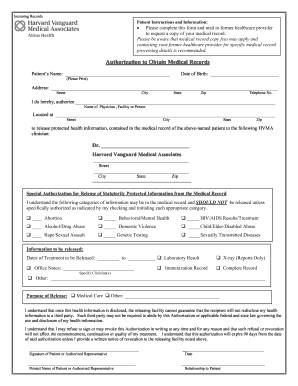
Get Harvard Vanguard Authorization To Obtain Medical Records
How it works
-

Open form follow the instructions
-

Easily sign the form with your finger
-

Send filled & signed form or save
How to fill out the Harvard Vanguard Authorization to Obtain Medical Records online
Filling out the Harvard Vanguard Authorization to Obtain Medical Records form online is a straightforward process that allows users to request their medical records efficiently. This guide will provide clear, step-by-step instructions to help users complete the form with confidence.
Follow the steps to fill out the form accurately.
- Press the ‘Get Form’ button to access the form and open it in your chosen editing tool.
- Begin by filling in your personal information. Write your full name, date of birth, and mailing address, including street, city, state, and zip code. Include a contact telephone number for clarity.
- Designate the healthcare provider or facility you are authorizing to release your medical records. Fill in their name, full address, city, state, and zip code in the provided spaces.
- Specify the clinician at Harvard Vanguard Medical Associates to whom your medical information will be sent. Include their name, address, city, state, and zip code.
- Review the special authorization section. If any of the categories listed (such as abortion, mental health, or genetic testing) apply, check the corresponding box to authorize the release of that protected information.
- Indicate the specific medical information you want released by choosing from options like office notes, laboratory results, or the complete record. Be sure to include dates of treatment that should be covered by this authorization.
- Clarify the purpose of release by marking the appropriate box. If the reason falls outside of medical care, provide a brief description.
- Review the acknowledgment section regarding the risks of disclosure. Ensure you understand the implications of releasing your health information.
- Sign and date the authorization form. If you are an authorized representative completing this form on behalf of the patient, print your name and specify your relationship to the patient.
- Once all fields are filled, save the completed document, then download, print, or share it with the former healthcare provider as needed.
Complete your Harvard Vanguard Authorization to Obtain Medical Records online today for quick and efficient access to your medical history.
To fill out authorization for the release of medical records, start by obtaining the Harvard Vanguard Authorization to Obtain Medical Records form. Provide accurate information, including your personal details, the recipient's information, and the specific records to be shared. Finally, ensure you sign and date the form to validate your request.