Loading
Get General Tenancy Agreement Form 18a - Bcdnbbrenetbbnetbau
How it works
-

Open form follow the instructions
-

Easily sign the form with your finger
-

Send filled & signed form or save
How to fill out the General Tenancy Agreement Form 18a - Bcdnbbrenetbbnetbau online
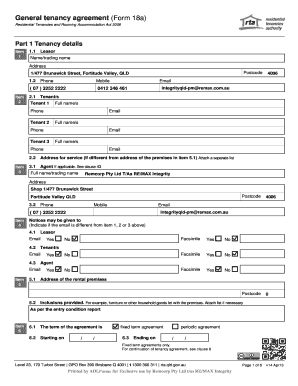
Filling out the General Tenancy Agreement Form 18a can be a straightforward process when approached step by step. This guide offers detailed instructions on each section and field of the form, making it accessible for users, regardless of their legal background.
Follow the steps to complete the form effectively.
- Click the ‘Get Form’ button to obtain the form and access it in the online editor.
- Provide the tenancy details in Part 1. Fill out the lessor's name and trading name, along with the address and postcode.
- Include the lessor's phone number and email address to ensure proper communication.
- Enter the tenants' details, starting with tenant 1's full name, phone, and email, followed by the necessary information for tenants 2 and 3, if applicable.
- Indicate the address for service if it differs from the rental premises address.
- If applicable, list the agent's details in item 3, including their full name, address, and contact information.
- Complete the rental details, including the rental price, frequency, method of payment, and where to pay the rent.
- Specify the rental bond amount in item 11.
- Indicate any services supplied to the premises that the tenant must pay for, such as electricity, gas, and water.
- Review the standard terms stated in Part 2, including rights and obligations concerning the premises.
- Fill out any special terms in Part 3, if applicable.
- After completing all necessary fields, save your changes and then download, print, or share the filled form as required.
Start completing your General Tenancy Agreement Form 18a online today!
An occupier has a legal right to live in a property set in stone with a signed contract which is normally an Assured Shorthold Tenancy agreement. On the other hand a guest can live in the same property but has no legal right to be there.