Loading
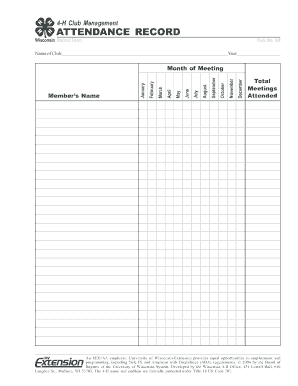
Get 4-h Club Management Attendance Record Record Form Pub No Ar - Learningstore Uwex
How it works
-

Open form follow the instructions
-

Easily sign the form with your finger
-

Send filled & signed form or save
How to fill out the 4-H Club Management ATTENDANCE RECORD Record Form Pub No AR - Learningstore Uwex online
This guide provides clear instructions on how to complete the 4-H Club Management attendance record form online. Follow these steps to ensure accurate documentation of club member attendance for the specified year.
Follow the steps to effectively complete the attendance record form.
- Press the ‘Get Form’ button to access the attendance record form and open it in your document editor.
- In the 'Name of Club' field, enter the full name of your 4-H club to identify your group clearly.
- Fill in the 'Year' section with the current year for which the attendance record is being maintained.
- For each month listed, indicate meetings attended by members. In the appropriate month column, input the attendance data for each member under the 'Member’s Name' section.
- At the end of the attendance record for each month, calculate the 'Total Meetings Attended' for each member and enter the total in the designated area.
- Review the completed form for accuracy and completeness before finalizing it.
- Once you have filled out all required sections, you can save your changes, download a copy for your records, print the form out, or share it with relevant individuals.
Start completing your 4-H Club attendance records online today!