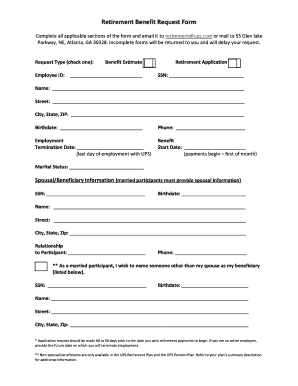
Retirement Benefit Request Form Complete all applicable sections of the form and email it to retirement ups.com or mail to 55 Glen lake Parkway, NE, Atlanta, GA 30328. Incomplete forms will be returned.

How it works
  • Open form

    Open form follow the instructions

  • Easily sign form

    Easily sign the form with your finger

  • Share form

    Send filled & signed form or save

How to fill out the Retirement Benefit Request Form online

Filling out the Retirement Benefit Request Form online can streamline your retirement benefits application process. This guide provides step-by-step instructions to help you complete the form accurately and efficiently.

Follow the steps to complete the form successfully.

  1. Click ‘Get Form’ button to obtain the form and open it in the editor.
  2. Begin by selecting your request type. Check either 'Benefit Estimate' or 'Retirement Application' as applicable.
  3. Fill in your Employee ID in the designated field.
  4. Provide your Social Security Number (SSN) in the specified area.
  5. Enter your full name, street address, city, state, and ZIP code to ensure accurate identification.
  6. Input your birthdate to verify your age eligibility.
  7. Add your phone number for contact purposes.
  8. In the Employment section, specify your termination date, noting your last day of employment with UPS.
  9. Indicate the benefit start date, reflecting when you wish your payments to commence.
  10. Select your marital status from the provided options.
  11. If married, complete the Spousal/Beneficiary Information section, including your spouse's SSN, birthdate, name, address, phone number, and their relationship to you.
  12. If you wish to designate a non-spousal beneficiary, fill in their details in the specified fields.
  13. Review all provided information for accuracy and completeness.
  14. Save your changes, then download, print, or share the form as needed. Finally, email it to retirement@ups.com or mail it to 55 Glen Lake Parkway, NE, Atlanta, GA 30328.

Complete your Retirement Benefit Request Form online today for a smoother application process.

Get form

Experience a faster way to fill out and sign forms on the web. Access the most extensive library of templates available.

Related content

Application For Retirement Insurance Benefits...

Form SSA-1-BK (03-2019) UF ... All other claimants must complete the entire form. ... If...

Learn more
Application for Retirement - NJ.gov

credit in ABP or multiple pension funds may be eligible for State- or employer-paid...

Learn more
Your Retirement Benefit—How it is figured...

Or, you can request a Statement by calling Social Security and asking for a form SSA-7004...

Learn more
Questions & Answers

Get answers to your most pressing questions about US Legal Forms API.

Contact support

How do I get a benefit verification letter?

You can request one online by using your my Social Security account, which will allow you to immediately view, print, and save a copy of the letter. You can call us to request one at 1-800-772-1213 (TTY 1-800-325-0778), Monday through Friday from 8:00 a.m. to 7:00 p.m.

To acquire the full amount, you need to maximize your working life and begin collecting your check until age 70. Another way to maximize your check is by asking for a raise every two or three years. Moving companies throughout your career is another way to prove your worth, and generate more money.

You can apply: Online; or. By calling our national toll-free service at 1-800-772-1213 (TTY 1-800-325-0778) or visiting your local Social Security office. Call ahead to make an appointment. If you do not live in the U.S. or one of its territories, you can also contact your nearest U.S.

You can request one online by using your my Social Security account, which will allow you to immediately view, print, and save a copy of the letter. You can call us to request one at 1-800-772-1213 (TTY 1-800-325-0778), Monday through Friday from 8:00 a.m. to 7:00 p.m.

You can start your retirement benefit at any point from age 62 up until age 70.

To track other resources you may have in retirement, start by getting your Social Security statement and an estimate of your retirement benefits on the Social Security Administration's website, .socialsecurity.gov/mystatement.

Get This Form Now!

Use professional pre-built templates to fill in and sign documents online faster. Get access to thousands of forms.

If you believe that this page should be taken down, please follow our DMCA take down process here.

Get Retirement Benefit Request Form