Loading
Form preview
  • US Legal Forms
  • Other Templates
  • More Forms
  • More Multi-State Forms
  • Anz Commercial Cards Maintenance Form

Get Anz Commercial Cards Maintenance Form

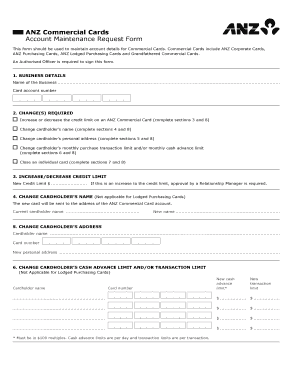
ANZ Commercial Cards Account Maintenance Request Form This form should be used to maintain account details for Commercial Cards. Commercial Cards include ANZ Corporate Cards, ANZ Purchasing Cards,.

How it works

  1. Open form

    Open form follow the instructions

  2. Easily sign form

    Easily sign the form with your finger

  3. Share form

    Send filled & signed form or save

How to fill out the Anz Commercial Cards Maintenance Form online

Completing the Anz Commercial Cards Maintenance Form online is a straightforward process that allows users to maintain their commercial card account details effectively. This guide provides clear instructions on how to navigate each section of the form to ensure all necessary changes are made accurately.

Follow the steps to complete the form efficiently.

  1. Click the ‘Get Form’ button to obtain the form and open it for editing.
  2. Enter your business details in the first section, including the name of the business and the card account number.
  3. In the next section, specify the change required. Indicate whether you need to increase or decrease the credit limit, change the cardholder’s name, update the cardholder’s personal address, adjust the monthly purchase transaction limit, or close an individual card.
  4. If you are increasing or decreasing the credit limit, enter the new credit limit in the designated field. Remember, if it’s an increase, approval from a Relationship Manager is necessary.
  5. If you are changing the cardholder's name, provide both the current name and the new name. This step is not applicable for Lodged Purchasing Cards.
  6. If changing the cardholder’s address, fill in the cardholder name, card number, and the new personal address in the appropriate fields.
  7. For adjustments to the cash advance limit or transaction limit, enter the new limits in the respective fields. Ensure the new limits follow the $100 multiples requirement.
  8. If closing a card, indicate the cardholder's name and card number, and confirm whether the card has been destroyed.
  9. Complete the authorization section by filling in the authorized signatory's name, providing signatures, and recording the date.
  10. Once you have filled out all sections, save your changes, and proceed to download, print, or share the form as needed.

Complete your Anz Commercial Cards Maintenance Form online today for efficient account management.

Get form

Experience a faster way to fill out and sign forms on the web. Access the most extensive library of templates available.
Get form

Related content

6-K 1 a05-22309_16k.htm CURRENT REPORT OF FOREIGN...
This Form 6-K may contain certain forward-looking statements, including statements ... A...
Learn more
Global Payments 2020-30 A quantium shift in the...
While bank notes may disappear, various forms of cash now ... Commercial cards are the...
Learn more
NetSuite 2020.2 Release Notes
Aug 26, 2020 — ANZ Localization. NetSuite ... To reschedule your Oracle Database Update...
Learn more

Related links form

TORONTO FRINGE FESTIVAL MEDIA LIST Singer 974 Manual Pdf Pdf Filler Instructions Refund For PRESTO Card (Station)

Questions & Answers

Get answers to your most pressing questions about US Legal Forms API.

Contact support

To activate your card log in to the ANZ App, tap More on the Accounts screen, then Activate Card and follow the prompts to set your PIN, or call 1800 652 033.

HOW DO I ACTIVATE MY NEW/REPLACEMENT ANZ VISA DEBIT CARD? To activate your card, please call us on +685 800199. Please do not use your card until it is activated.

Contact your Relationship Manager or call us on 0800 269 347 to link your business credit card to ANZ Direct Online or ANZ Transactive.

To make a general enquiry call the ANZ Commercial Card Service Centre on 1800 032 481.

To activate your new credit card you'll need the credit card number and your date of birth. You can either activate your card via online banking, mobile banking, phoning the card provider directly or using an ATM machine.

A replacement card can be ordered by contacting the ANZ Commercial Card Service Centre on 1800 032 481.

How do I register for international services? Log in to ANZ Internet Banking. Go to the Payments menu. Select International services. Read and accept the terms and conditions. Select Apply.

Get This Form Now!

Use professional pre-built templates to fill in and sign documents online faster. Get access to thousands of forms.
Get form
If you believe that this page should be taken down, please follow our DMCA take down processhere.
Get Anz Commercial Cards Maintenance Form
Get form
  • Adoption
  • Bankruptcy
  • Contractors
  • Divorce
  • Home Sales
  • Employment
  • Identity Theft
  • Incorporation
  • Landlord Tenant
  • Living Trust
  • Name Change
  • Personal Planning
  • Small Business
  • Wills & Estates
  • Packages A-Z
  • Affidavits
  • Bankruptcy
  • Bill of Sale
  • Corporate - LLC
  • Divorce
  • Employment
  • Identity Theft
  • Internet Technology
  • Landlord Tenant
  • Living Wills
  • Name Change
  • Power of Attorney
  • Real Estate
  • Small Estates
  • Wills
  • All Forms
  • Forms A-Z
  • Other Templates
  • Legal Hub
  • About Us
  • Help Portal
  • Legal Resources
  • Blog
  • Affiliates
  • Contact Us
  • Delete My Account
  • Site Map
  • Industries
  • Forms in Spanish
  • Localized Forms
  • State-specific Forms
  • Forms Kit
  • Real Estate Handbook
  • All Guides
  • Notarize
  • Incorporation services
  • For Consumers
  • For Small Business
  • For Attorneys
  • USLegal
  • FormsPass
  • pdfFiller
  • signNow
  • altaFlow
  • DocHub
  • Instapage
Form Packages
  • Adoption
  • Bankruptcy
  • Contractors
  • Divorce
  • Home Sales
  • Employment
  • Identity Theft
  • Incorporation
  • Landlord Tenant
  • Living Trust
  • Name Change
  • Personal Planning
  • Small Business
  • Wills & Estates
  • Packages A-Z
Form Categories
  • Affidavits
  • Bankruptcy
  • Bill of Sale
  • Corporate - LLC
  • Divorce
  • Employment
  • Identity Theft
  • Internet Technology
  • Landlord Tenant
  • Living Wills
  • Name Change
  • Power of Attorney
  • Real Estate
  • Small Estates
  • Wills
  • All Forms
  • Forms A-Z
  • Other Templates
Customer Service
  • Legal Hub
  • About Us
  • Help Portal
  • Legal Resources
  • Blog
  • Affiliates
  • Contact Us
  • Delete My Account
  • Site Map
  • Industries
  • Forms in Spanish
  • Localized Forms
  • State-specific Forms
  • Forms Kit
Legal Guides
  • Real Estate Handbook
  • All Guides
Prepared for you
  • Notarize
  • Incorporation services
Our Customers
  • For Consumers
  • For Small Business
  • For Attorneys
Our Sites
  • USLegal
  • FormsPass
  • pdfFiller
  • signNow
  • altaFlow
  • DocHub
  • Instapage
Social Media
Call us now toll free:
+1 833 426 79 33
As seen in:
© Copyright 1999-2026 airSlate Legal Forms, Inc. 17 Station Street, Ste. 203, Brookline, MA 02445
  • Your Privacy Choices
  • Terms of Service
  • Privacy Notice
  • Content Takedown Policy
  • Bug Bounty Program