Loading
Get Markel Contractor Supplemental Application 2005-2026
How it works
-

Open form follow the instructions
-

Easily sign the form with your finger
-

Send filled & signed form or save
How to fill out the Markel Contractor Supplemental Application online
Filling out the Markel Contractor Supplemental Application is a crucial step in securing the necessary insurance for your contracting business. This guide provides clear, step-by-step instructions to help you complete the form efficiently and accurately.
Follow the steps to complete your application successfully.
- Click ‘Get Form’ button to obtain the form and open it in the editor.
- Begin by filling out the applicant information section. Provide your location address, applicant's name, and mailing address accurately to ensure correct correspondence.
- Indicate your time in business and years of experience in the relevant fields. Answer the questions regarding licensing, including whether you hold a license and its details.
- Complete the percentage of operations section by specifying the types of contracting work you perform and the respective percentage of operations for each category listed.
- Answer the questions related to other operations, supervision of subcontractors, and provide details on the radius of your operations and states worked.
- Fill out the payroll information for various categories, including owners, officers, and other employees. Provide details on the total payroll.
- Respond to questions regarding the employment of licensed professionals and the presence of prior or planned jobs covered by specific insurance policies.
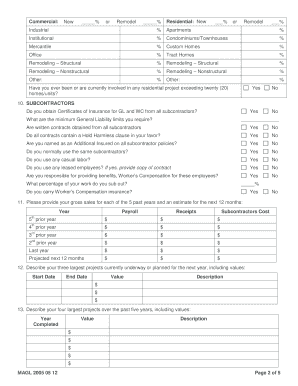
- List the percentage of work done in specified categories, making sure to give accurate estimates based on your operations.
- Complete the subcontractors section, detailing your practices regarding insurance certificates, contracts, and your general liability requirements.
- Provide your gross sales figures for the past five years, including estimates for the next year, ensuring that all figures are complete and accurate.
- Describe your largest current or planned projects along with their values. Include significant projects from the past five years as well.
- Fill out any additional questions related to equipment rental, project specifics, and any issues related to claims or legal actions.
- Once you have completed all sections, review your responses for accuracy. Save your changes, and choose to download, print, or share the form as needed.
Take the next step towards securing your business by completing your application online today.