Loading
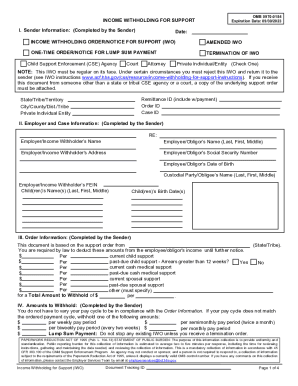
Get Hhs Income Withholding For Support
How it works
-

Open form follow the instructions
-

Easily sign the form with your finger
-

Send filled & signed form or save
How to fill out the HHS Income Withholding For Support online
Filling out the HHS Income Withholding For Support form online is an important step in ensuring that support payments are collected in a timely manner. This guide will provide you with clear instructions to simplify the process and help you fill out each section accurately.
Follow the steps to complete the form effectively.
- Click ‘Get Form’ button to obtain the form and open it in your preferred online document editor.
- In Section I, Sender Information, enter your details as the sender. This includes the date, whether it's an Income Withholding Order/Notice for Support, Amended IWO, One-time Order/Notice for Lump Sum Payment, or Termination of IWO. Specify your type as Child Support Enforcement Agency, Attorney, Court, or Private Individual/Entity. Include the Remittance ID, Order ID, and Case ID, along with your State, City, or Tribe.
- In Section II, Employer and Case Information, fill in the Employer's name and address. Then provide the Employee/Obligor’s name, Social Security number, date of birth, and details about the custodial party/obligee and any children related to support.
- In Section III, Order Information, based on the underlying support order, enter the amounts to be withheld for current child support, past-due support amounts, and any cash medical or spousal support.
- In Section IV, Amounts to Withhold, select the appropriate withholding amount based on the pay cycle. This includes options for semimonthly, weekly, biweekly, or monthly pay periods.
- In Section V, Remittance Information, indicate when to begin withholding, the deadline for sending payments, and the percentage of disposable income to be withheld if the full amount cannot be deducted. Make sure to include the Remittance ID.
- In Section VI, Additional Information for Employers/Income Withholders, you may need to provide specific policies regarding withholdings and payment deadlines, along with liability and compliance notes.
- In Section VII, Notification of Employment Termination or Income Status, if applicable, provide updates regarding whether the employee/obligor is still employed or has received periodic income. Fill in the termination date and other necessary contact information.
- In Section VIII, Contact Information, fill in the contact details for both the employer/income withholder and employee/obligor. Ensure all contact methods are accurate for ease of communication.
- Once all sections are completed, ensure to review and save your changes before downloading, printing, or sharing the form as required.
Start the process of filling out your HHS Income Withholding For Support form online today to ensure timely support payments.
Related links form
It means that the Income Withholding Order was terminated. An Income Withholding Order is often issued by the Court to withhold income from paychecks.