Loading
Get Service Libertynational Com
How it works
-

Open form follow the instructions
-

Easily sign the form with your finger
-

Send filled & signed form or save
How to fill out the Service Libertynational Com online
Filling out the Service Libertynational Com form can seem daunting, but with this guide, you will find clear instructions to navigate each section with ease. Whether you are making changes to your policy or designating beneficiaries, this step-by-step approach will help you complete the process effectively.
Follow the steps to successfully complete the form online.
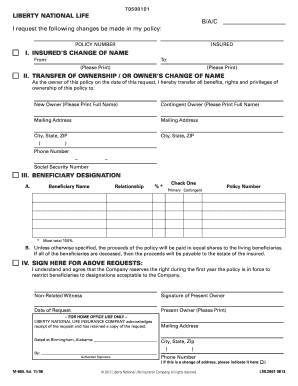
- Press the ‘Get Form’ button to retrieve the online form and open it for editing.
- Begin by entering your policy number at the top of the form. This identifies your specific policy.
- Move to section I, where you will indicate a change of name for the insured. Enter the former name in the 'From' field and the new name in the 'To' field. Ensure that both names are clearly printed.
- In section II, if you are transferring ownership or changing the owner's name, write the full name of the new owner in the appropriate field. If there is a contingent owner, include their name as well. Input the mailing address, city, state, and ZIP code for both individuals. Additionally, provide the phone number and social security number of the new owner.
- Proceed to section III to designate beneficiaries. In the sub-section A, enter the beneficiary's name, their relationship to the insured, and the percentage of benefits they will receive. Ensure that the total percentage equals 100%. Indicate whether the beneficiary is primary or contingent by checking the appropriate box.
- In section B, review the instructions regarding beneficiary proceeds. Note that if all listed beneficiaries are deceased, the proceeds will go to the insured's estate.
- Sign and date the form where indicated in section IV, confirming your requests. Print your name clearly in the 'Present Owner' field. Additionally, have a non-related witness sign the form.
- Once you have completed the form and made sure all information is accurate, you have the option to save changes, download, print, or share the completed document as necessary.
Complete your documents online efficiently and ensure your policy details are accurate.
The Liberty National Holding Company, created in 1979, expanded by acquiring United American, along with Globe Life and Accident Insurance Company and American Income Life. In the 1980s, the Liberty National Insurance Holding Company became Torchmark Corporation which then became Globe Life on August 8, 2019.