Loading
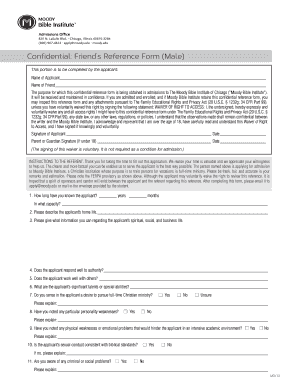
Get Moody Bible Institute Friend's Reference Form 2011-2026
How it works
-

Open form follow the instructions
-

Easily sign the form with your finger
-

Send filled & signed form or save
How to fill out the Moody Bible Institute Friend's Reference Form online
Completing the Moody Bible Institute Friend's Reference Form online is a straightforward process. This guide will help you navigate the various sections and fields of the form to ensure your reference is submitted accurately and effectively.
Follow the steps to successfully complete the reference form.
- Click ‘Get Form’ button to obtain the form and open it in your preferred online format.
- Fill in the applicant’s name in the designated section at the top of the form. Ensure that the name is spelled correctly to avoid any confusion.
- Enter your name as the friend providing the reference in the specified field. This information will identify you as the referent.
- In the purpose section, it is important to note that this form is for admissions to the Moody Bible Institute. Ensure you understand the confidentiality of the information provided.
- Decide whether to sign the waiver of right to access section. You may choose to waive your right to access the information contained in this reference form.
- Complete the instruction section directed to you. Answer questions regarding how long you have known the applicant, the capacity in which you know them, and other inquiries about the applicant's life.
- Provide detailed responses to each question, ensuring clarity and honesty to support the applicant in their admission process. Consider providing examples where applicable.
- Circle relevant traits that best describe the applicant as requested in the personality traits section. Be mindful to select only one descriptor for each trait.
- In the final comments section, feel free to add any additional information regarding the applicant’s qualifications for ministry, including comparisons to other candidates if possible.
- Complete your information by providing your name, signature, date, address, phone number, and email address. Make sure everything is clear and legible.
- Upon completion, save the changes made to the document. You can then download, print, or share the form via email as instructed to submit it to the admissions office.
Take the time to complete the Moody Bible Institute Friend's Reference Form online today to support the applicant’s journey.
Moody Bible Institute is accredited by the Association for Biblical Higher Education Commission on Accreditation (COA).