We use cookies to improve security, personalize the user experience, enhance our marketing activities (including cooperating with our marketing partners) and for other business use.
Click "here" to read our Cookie Policy. By clicking "Accept" you agree to the use of cookies. Read less
Read more
Accept
Loading
Form preview
  • US Legal Forms
  • Form Library
  • More Forms
  • More Multi-State Forms
  • Hotwire 6310 Mvl Modem Customer Premises Installation Instructions - 6310-a2-gn10-40

Get Hotwire 6310 Mvl Modem Customer Premises Installation Instructions - 6310-a2-gn10-40

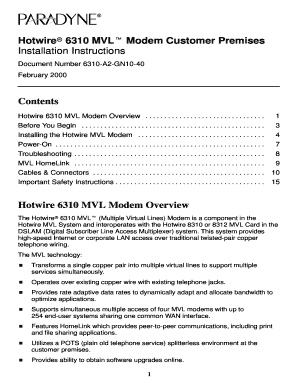
Hotwirer 6310 MVLt Modem Customer Premises Installation Instructions Document Number 6310A2GN1040 February 2000 Contents Hotwire 6310 MVL Modem Overview . . . . . . . . . . . . . . . . . . . . . .

How it works

  1. Open form

    Open form follow the instructions

  2. Easily sign form

    Easily sign the form with your finger

  3. Share form

    Send filled & signed form or save

How to fill out the Hotwire 6310 MVL Modem Customer Premises Installation Instructions - 6310-A2-GN10-40 online

This guide provides a comprehensive overview of the steps needed to fill out the Hotwire 6310 MVL Modem Customer Premises Installation Instructions. Whether you are experienced or new to filling out such documents, this structured approach will help you navigate the form confidently.

Follow the steps to complete the installation instructions form effectively.

  1. Press the ‘Get Form’ button to access the installation instructions document online. This allows you to begin filling out the required fields right away.
  2. Review the 'Before You Begin' section to ensure you have all the necessary components for installation. This includes the Hotwire 6310 MVL modem, the interface cable, power cord, and any filters required.
  3. Proceed to the 'Installing the Hotwire 6310 MVL Modem' section. Follow the instructions closely, beginning with unplugging any existing telephone lines, connecting the MVL interface cable, and ensuring proper Ethernet connections.
  4. In the 'Power-On' section, confirm that you understand the LED indicators' meanings. This will help you assess the modem’s functionality as you complete the power-on process.
  5. Utilize the 'Troubleshooting' section to familiarize yourself with common issues and their solutions. This knowledge is essential for maintaining effective operation of the modem.
  6. Conclude by saving your changes to the document. You can also choose to download, print, or share the completed installation instructions online as necessary.

Take the next step and fill out your Hotwire 6310 MVL Modem Customer Premises Installation Instructions online today.

Get form

Experience a faster way to fill out and sign forms on the web. Access the most extensive library of templates available.
Get form

Related content

Paradyne 6310 Mvlt Users Manual Hotwire MVL Modem...
Modem Customer Premises. Installation Instructions. Document Number 6310-A2-GN10-40...
Learn more

Related links form

Create A Form With Microsoft Forms - Office Support Computer Science A Level Zimsec Past Papers Le CILEC De Saint-Etienne New Patient Registration Application - Kinston Community Health ... - Kinstonhealth

Questions & Answers

Get answers to your most pressing questions about US Legal Forms API.

Contact support

The fastest residential speed available delivered right to your door by Hotwire's state-of-the-art fiber net- work. Our service provides up to 1 Gbps download speed (that's 1000 Mbps) and up to 100 Mbps upload.

About Hotwire Communications Internet It is a Cable provider, which means they deliver service by utilizing the cable television lines they are already running to your home. Typically, you will get a cable modem or cable box from which you can connect your in home router.

But if you do decide to buy a third-party router, you'll have to configure it on your own to work with your broadband connection and there are cases where you'll still need to use your provider's supplied router as a modem.

How does a third-party router work? It works in the same way as the hardware posted out by your broadband provider. There'll be a different username and password combination, but it'll still plug into a phone socket and distribute data wirelessly or via Ethernet.

The default admin username and password is admin/admin. Select Login. It is imperative that you document and keep the new administrator password in a safe place. Hotwire Communications will not have a record of your new password.

Get This Form Now!

Use professional pre-built templates to fill in and sign documents online faster. Get access to thousands of forms.
Get form
If you believe that this page should be taken down, please follow our DMCA take down processhere.

Industry-leading security and compliance

US Legal Forms protects your data by complying with industry-specific security standards.
  • In businnes since 1997
    25+ years providing professional legal documents.
  • Accredited business
    Guarantees that a business meets BBB accreditation standards in the US and Canada.
  • Secured by Braintree
    Validated Level 1 PCI DSS compliant payment gateway that accepts most major credit and debit card brands from across the globe.
Get Hotwire 6310 MVL Modem Customer Premises Installation Instructions - 6310-A2-GN10-40
Get form
Form Packages
Adoption
Bankruptcy
Contractors
Divorce
Home Sales
Employment
Identity Theft
Incorporation
Landlord Tenant
Living Trust
Name Change
Personal Planning
Small Business
Wills & Estates
Packages A-Z
Form Categories
Affidavits
Bankruptcy
Bill of Sale
Corporate - LLC
Divorce
Employment
Identity Theft
Internet Technology
Landlord Tenant
Living Wills
Name Change
Power of Attorney
Real Estate
Small Estates
Wills
All Forms
Forms A-Z
Form Library
Customer Service
Terms of Service
Privacy Notice
Legal Hub
Content Takedown Policy
Bug Bounty Program
About Us
Help Portal
Legal Resources
Blog
Affiliates
Contact Us
Delete My Account
Site Map
Industries
Forms in Spanish
Localized Forms
State-specific Forms
Forms Kit
Legal Guides
Real Estate Handbook
All Guides
Prepared for You
Notarize
Incorporation services
Our Customers
For Consumers
For Small Business
For Attorneys
Our Sites
US Legal Forms
USLegal
FormsPass
pdfFiller
signNow
airSlate WorkFlow
DocHub
Instapage
Social Media
Call us now toll free:
+1 833 426 79 33
As seen in:
  • USA Today logo picture
  • CBC News logo picture
  • LA Times logo picture
  • The Washington Post logo picture
  • AP logo picture
  • Forbes logo picture
© Copyright 1997-2025
airSlate Legal Forms, Inc.
3720 Flowood Dr, Flowood, Mississippi 39232
Form Packages
Adoption
Bankruptcy
Contractors
Divorce
Home Sales
Employment
Identity Theft
Incorporation
Landlord Tenant
Living Trust
Name Change
Personal Planning
Small Business
Wills & Estates
Packages A-Z
Form Categories
Affidavits
Bankruptcy
Bill of Sale
Corporate - LLC
Divorce
Employment
Identity Theft
Internet Technology
Landlord Tenant
Living Wills
Name Change
Power of Attorney
Real Estate
Small Estates
Wills
All Forms
Forms A-Z
Form Library
Customer Service
Terms of Service
Privacy Notice
Legal Hub
Content Takedown Policy
Bug Bounty Program
About Us
Help Portal
Legal Resources
Blog
Affiliates
Contact Us
Delete My Account
Site Map
Industries
Forms in Spanish
Localized Forms
State-specific Forms
Forms Kit
Legal Guides
Real Estate Handbook
All Guides
Prepared for You
Notarize
Incorporation services
Our Customers
For Consumers
For Small Business
For Attorneys
Our Sites
US Legal Forms
USLegal
FormsPass
pdfFiller
signNow
airSlate WorkFlow
DocHub
Instapage
Social Media
Call us now toll free:
+1 833 426 79 33
As seen in:
  • USA Today logo picture
  • CBC News logo picture
  • LA Times logo picture
  • The Washington Post logo picture
  • AP logo picture
  • Forbes logo picture
© Copyright 1997-2025
airSlate Legal Forms, Inc.
3720 Flowood Dr, Flowood, Mississippi 39232