Loading
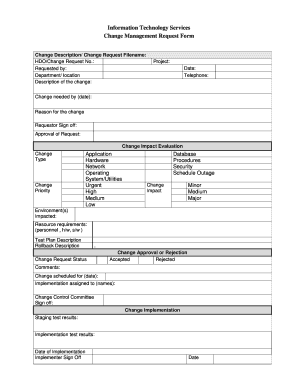
Get Information Technology Services Change Management Request Form - Pvamu
How it works
-

Open form follow the instructions
-

Easily sign the form with your finger
-

Send filled & signed form or save
How to fill out the Information Technology Services Change Management Request Form - Pvamu online
Filling out the Information Technology Services Change Management Request Form - Pvamu is a crucial step in initiating necessary changes within your organization. This guide provides clear instructions to help you efficiently complete the form online, ensuring you provide all required information.
Follow the steps to effectively complete the form.
- Click the ‘Get Form’ button to retrieve and open the form in your preferred editor.
- Begin by entering the change description and the change request filename. This section outlines what the change entails, so be specific and thorough.
- Fill in the HDO/Change Request No. to uniquely identify your request. This aids in tracking and processing your change request efficiently.
- Provide the name of the person requesting the change in the 'Requested by' field, along with the respective department or location.
- In the 'Description of the change' field, elaborate on the change, ensuring you detail how it will impact current operations.
- Specify the project associated with this change, as well as the date by which the change is needed. This helps prioritize your request.
- Enter the telephone number where you can be reached for any follow-up queries regarding your request.
- Stating the reason for the change is essential. Clearly articulate why the change is necessary and what benefits it will bring to the organization.
- Complete the 'Requestor Sign off' to indicate you have reviewed the details before submission.
- Provide approval for the request by obtaining necessary signatures or approvals indicated in the 'Approval of Request' section.
- Evaluate the change impact by selecting the change type from the associated categories: Application, Hardware, Network, Operating System/Utilities, and the priority level: Urgent, High, Medium, or Low.
- Assess and select the change impact level: Minor, Medium, or Major, based on the expected implications of the change.
- List the environments impacted by the change and provide details regarding resource requirements including personnel, hardware, and software.
- Develop a test plan description to evaluate the change post-implementation and include a rollback description in case the change needs to be reverted.
- Once all sections are filled, you can save changes, download, print, or share the form using the options available in your editor.
Complete the Information Technology Services Change Management Request Form - Pvamu online today to initiate your change request.
ITIL Change management is a part of service transition stage that recommends a process flow to evaluate, plan and deploy a specific change request. The primary objective of ITIL Change management is to ensure that change execution does not interrupt ongoing operations.