Loading
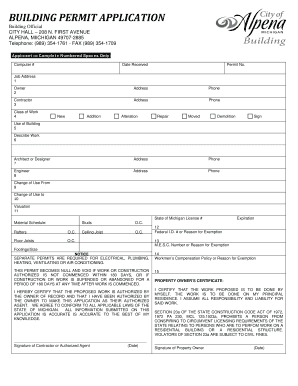
Get Mi Building Permit Application - Alpena City
How it works
-

Open form follow the instructions
-

Easily sign the form with your finger
-

Send filled & signed form or save
How to fill out the MI Building Permit Application - Alpena City online
Filling out the MI Building Permit Application for Alpena City is an essential step for anyone looking to undertake construction or renovation projects. This guide will provide you with clear instructions to navigate the application process efficiently and correctly.
Follow the steps to successfully complete your application.
- Click 'Get Form' button to retrieve the application and open it for editing.
- In the application form, start by providing the job address. This is the location where the work will take place. Ensure the address is complete and accurate.
- Next, fill in the owner's information. This includes the owner's name, address, and phone number. Verify that the information is correctly entered, as it is crucial for contact purposes.
- Enter the contractor's details, including the contractor's name, address, and phone number. If you are the owner performing the work yourself, indicate this as well.
- Select the class of work you are applying for by checking one of the following options: New, Addition, Alteration, Repair, Moved, Demolition, or Sign.
- Describe the work to be done in detail. This section should provide a brief overview of your project and its objectives.
- Fill out the information for the architect or designer, if applicable. Include the name, address, and phone number.
- If an engineer is involved in the project, provide their details in the respective section.
- Indicate any change of use for the building, filling out both the 'Change of Use From' and 'Change of Use To' fields.
- Complete the valuation of the job by entering the estimated cost of the project in the relevant field.
- Provide your Michigan State License number, or a reason for exemption if applicable.
- Include any additional information required in the material schedule section, detailing specifics about rafters, floor joists, studs, and ceiling joists.
- Sign the application indicating that you have the authority to make this application and that all information is accurate to the best of your knowledge. Include the date of your signature.
- Once all fields are completed, review your application for accuracy. Then, you can choose to save your changes, download, print, or share the completed form as needed.
Complete your MI Building Permit Application online today to ensure a smooth process for your construction project.
Plans and Specifications (Construction Documents) The seal and signature are not required for one- and two- family dwellings less than 3500 square feet of calculated floor area and public works less than $15,000 in total construction cost.