Loading
Get Uk Hmrc Sa102 2021-2026
How it works
-

Open form follow the instructions
-

Easily sign the form with your finger
-

Send filled & signed form or save
How to fill out the UK HMRC SA102 online
Filling out the UK HMRC SA102 form online is a crucial step for individuals reporting their employment income for tax purposes. This guide will provide a detailed walkthrough of each section to ensure accurate completion and filing.
Follow the steps to successfully fill out your SA102 form.
- Click ‘Get Form’ button to access the SA102 form and open it for editing.
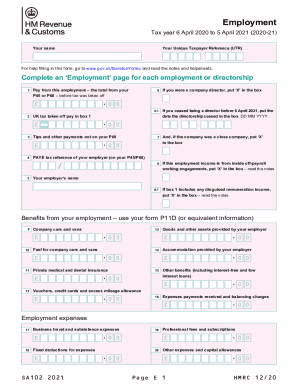
- Enter your name and Unique Taxpayer Reference (UTR) in the designated fields at the top of the form.
- For each employment or directorship, complete the 'Employment' page. Begin with filling in the 'Pay from this employment' using the total shown on your P45 or P60 before tax deductions.
- Record the UK tax deducted from your pay in the corresponding box, reflected as 'UK tax taken off pay in box 1'.
- If applicable, indicate if the company was a close company by marking 'X' in the provided box.
- If your employment income is from off-payroll working engagements, denote this by marking ‘X’ in the appropriate box.
- Fill in the PAYE tax reference of your employer, which can be found on your P45 or P60.
- If you stopped being a director before 6 April 2021, enter the end date of your directorship in the specified DD MM YYYY format.
- Detail any tips and other payments that are not included on your P60.
- Indicate if you were a company director by marking 'X' in the relevant box.
- Provide your employer's name in the designated area.
- If your total in box 1 includes any disguised remuneration income, mark ‘X’ in the appropriate box.
- For benefits from your employment, use the information from your form P11D to fill in the various sections regarding company cars, accommodation, medical insurance, and other benefits.
- Report any employment expenses such as business travel and subsistence, fixed deductions, and professional fees in their respective fields.
- Once all sections are complete, review the form for accuracy. You may then save changes, download, print, or share the completed form as needed.
Start the process today by completing the UK HMRC SA102 form online for a smooth tax reporting experience.
We act as agents with our client's dealings with HM Revenue and Customs (HMRC) and sometimes they get it wrong. ... A recent incident has highlighted how easy this can be.