Loading
Get Wa Dshs 14-467 2020-2026
How it works
-

Open form follow the instructions
-

Easily sign the form with your finger
-

Send filled & signed form or save
How to fill out the WA DSHS 14-467 online
Filling out the WA DSHS 14-467, also known as the mid-certification review form, is essential for continuing to receive benefits. This guide provides detailed, step-by-step instructions to help you complete the form online efficiently.
Follow the steps to successfully complete your mid-certification review form.
- Press the ‘Get Form’ button to access the WA DSHS 14-467 form and open it in the online editor.
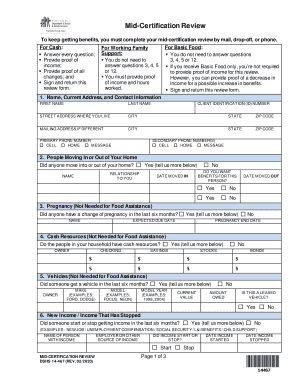
- Complete section one by providing your name, current address, contact information, and client identification number. Be sure to input your primary and any secondary phone numbers.
- In section two, indicate whether anyone has moved into or out of your home. If applicable, provide details such as their relationship to you, names, and the relevant dates.
- For section three, if applicable, report any changes in pregnancy status for individuals in your household and include due dates.
- In section four, specify whether anyone has cash resources. If so, indicate the owner and provide details about accounts held.
- In section five, disclose any recent vehicle changes. Include ownership, make, model, year, current value, and any outstanding amounts owed.
- Section six asks about new income or income that has stopped. Provide names, sources of income, and relevant dates for any changes.
- If applicable, in section seven, mention any lottery or gambling winnings that exceed $3,500. Include the winner's name, amount, and date received.
- Section eight relates to earnings or self-employment income. Provide the names of those earning income, their employers, and payment details.
- In section nine, report any changes in child support obligations, including amounts and names of relevant parties.
- Section ten focuses on income from other sources. List all applicable income sources and amounts received.
- In section eleven, outline your monthly expenses for rent or mortgage, and if someone else contributes to those costs.
- For section twelve, detail the utilities paid separately from your rent or mortgage.
- In section thirteen, indicate whether you wish to register to vote or update your voter registration.
- Finally, provide your signature and date in section fourteen, confirming the information provided is true and complete.
- Once all sections are complete, save your changes. You can then download, print, or share the completed form as needed.
Complete your WA DSHS 14-467 form online today to ensure your benefits continue without interruption.