Loading
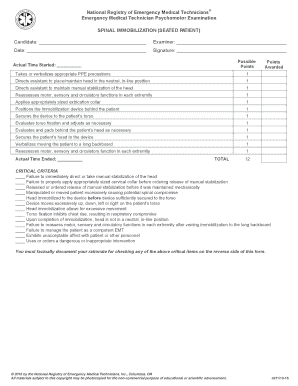
Get Spinal Immobilization (seated Patient) - Nremt
How it works
-

Open form follow the instructions
-

Easily sign the form with your finger
-

Send filled & signed form or save
How to fill out the Spinal Immobilization (Seated Patient) - Nremt online
This guide provides a clear and professional overview on how to accurately complete the Spinal Immobilization (Seated Patient) form for the Nremt examination. Following these steps will ensure that you provide the necessary information in an organized and effective manner.
Follow the steps to fill out the form correctly.
- Click the ‘Get Form’ button to access the Spinal Immobilization (Seated Patient) form and open it in your preferred editing tool.
- Enter the candidate's name in the designated field, ensuring that the spelling is correct and complete.
- Fill in the examiner's name in the appropriate section. This identifies the individual overseeing the examination process.
- Input the date of the examination in the designated field to maintain accurate records.
- In the 'Actual Time Started' section, document the time when the immobilization procedure begins.
- Go through each checklist item, providing necessary verbalizations or actions taken as described, marking points accordingly.
- Ensure that any critical criteria, if noted, are documented with a rationale on the reverse side of the form.
- Complete the 'Actual Time Ended' section to indicate when the immobilization procedure concludes.
- Finally, review all entries for accuracy and completeness before saving changes or printing the completed form.
Complete your documents online today for a seamless experience.
A spinal cord injury can cause one or more symptoms, including: Numbness, tingling, or a loss of or changes in sensation in hands and feet. Paralysis that may happen immediately or develop over time as swelling and bleeding affects the spinal cord. Pain or pressure in your head, neck, or back.