Loading
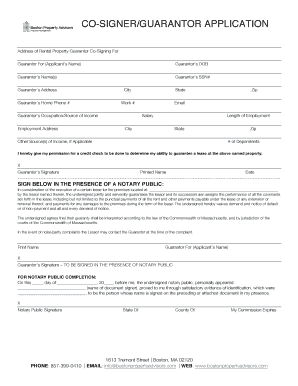
Get Bpa Co-signer Form - 4.18.docx
How it works
-

Open form follow the instructions
-

Easily sign the form with your finger
-

Send filled & signed form or save
How to fill out the BPA Co-Signer Form - 4.18.docx online
Completing the BPA Co-Signer Form - 4.18.docx online is a straightforward process that ensures all necessary information is collected to support a lease application. This guide will walk you through each section of the form to help you provide accurate information with confidence.
Follow the steps to successfully complete the BPA Co-Signer Form online.
- Press the ‘Get Form’ button to access the BPA Co-Signer Form - 4.18.docx and open it in your preferred document editor.
- Begin filling out the form by providing the address of the rental property for which you are acting as a guarantor, along with the applicant's name.
- Fill in the guarantor's date of birth in the designated field.
- Enter the full name of the guarantor(s) as it appears on legal documentation.
- Provide the guarantor’s Social Security number where indicated.
- Input the guarantor’s residential address, including street address, city, state, and zip code.
- Fill in the guarantor's home phone number and work number.
- Enter the guarantor’s email address for communication purposes.
- Indicate the guarantor’s occupation or source of income, and include the employment address.
- State the annual salary or income earned as well as the duration of employment.
- If applicable, provide details of any additional sources of income.
- Specify the number of dependents if there are any.
- Read the permission statement for a credit check. If in agreement, you will need to sign and print your name in the provided fields.
- The form requires a signature in front of a notary public, so leave that section for completion at the time of notarization.
- Finally, ensure all fields are filled accurately and save the document. You can then download, print, or share the completed form as needed.
Complete the BPA Co-Signer Form online today to facilitate your lease application process.