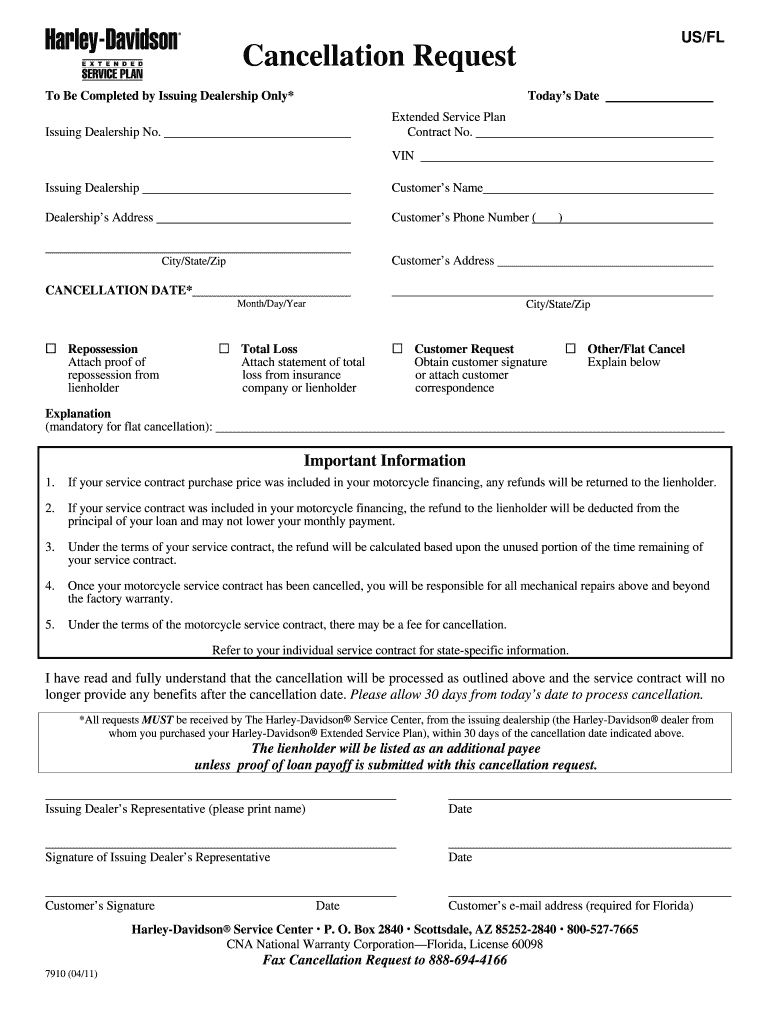
’s Address Customer’s Phone Number ( ) Customer’s Address City/State/Zip CANCELLATION DATE* Month/Day/Year Repossession Attach proof of repossession from lienholder City/State/Zip Total Loss Attach statement of total loss from insurance company or lienholder Customer Request Obtain customer signature or attach customer correspondence Other/Flat Cancel Explain below Explanation (mandatory for flat cancellation): Important Information 1. If your service contract .

Open form follow the instructions

Easily sign the form with your finger

Send filled & signed form or save
How to fill out the Harley-Davidson 7910 online
Filling out the Harley-Davidson 7910 cancellation request can be straightforward when you have clear instructions. This guide will walk you through each section of the form to ensure that your cancellation request is complete and accurate.
Follow the steps to effectively complete the Harley-Davidson 7910 form.
- Click ‘Get Form’ button to obtain the Harley-Davidson 7910 form and open it in the editor for online completion.
- Fill in today's date at the top of the form. This is important for tracking the cancellation request timeline.
- Enter the extended service plan information, including the contract number and issuing dealership number. Ensure accuracy to prevent processing delays.
- Provide the Vehicle Identification Number (VIN). This number is crucial for identifying the specific motorcycle associated with the service plan.
- Input the name of the issuing dealership. This should match the dealership where the original service plan was purchased.
- Fill out the customer's name as it appears on the service contract.
- Complete the dealership's address and the customer's phone number. Make sure the contact details are correct to avoid communication issues.
- Provide the customer’s address, including city, state, and zip code. Accurate information will assist in proper processing of the cancellation.
- Specify the cancellation date in the required format (month/day/year). This is essential for determining the validity of the request.
- Select the reason for cancellation by checking the appropriate box. Additional documentation may be required based on your selection, such as proof of repossession or a total loss statement.
- If applicable, attach the required documentation for the selected reason. This might include a repossession proof from a lienholder or a statement from your insurance company.
- Provide an explanation for flat cancellations. This section is mandatory for clarity on the cancellation process.
- Review the important information section carefully. Acknowledge your understanding of the cancellation terms, as this will impact financial aspects regarding the service contract.
- Have the issuing dealer's representative print their name, sign, and date the form at the designated area.
- Ensure the customer signs and dates the form as well. Also, include the customer’s email address if you are in Florida, as it is required.
- Once all fields are completed, save your changes. You can also download, print, or share the completed form as needed.
Complete your Harley-Davidson 7910 cancellation request online for a smooth processing experience.
Experience a faster way to fill out and sign forms on the web. Access the most extensive library of templates available.
Related content
Jan 30, 2014 — Worldwide retail sales of new Harley-Davidson motorcycles grew 5.7% in...
Aug 20, 2024 — Motorcyclists are among the most vulnerable users of the roadway system...
Jan 28, 2015 — Although 2014's models didn't break any records in our Performance Index...
Get answers to your most pressing questions about US Legal Forms API.
How to read Harley model numbers?
Reading Harley model numbers involves understanding the alphanumeric code presented on the bike. The first digits often represent the family's motorcycle type, while subsequent numbers indicate engine size and design year. For the Harley-Davidson 7910, familiarize yourself with this code to identify its specifications and maintenance needs effectively.
How to fill up gas step by step?
To fill up gas step by step, first park your Harley securely at the pump. Next, remove the gas cap, and insert the nozzle firmly into the tank. Squeeze the handle to pump gas, watching the gauge closely. When done, replace the cap securely to prevent leaks, especially on your Harley-Davidson 7910, which requires careful fuel management.
How do you open the gas tank on a Harley?
Opening the gas tank on a Harley involves locating the gas cap, which may require a key for security on some models. Turn the key or twist the cap counterclockwise to release it, allowing you direct access to the tank for refueling. Always ensure that your Harley-Davidson 7910 is parked securely before attempting to open the cap.
How are you supposed to put gas in a Harley?
When you put gas in a Harley, remove the gas cap, then insert the nozzle, ensuring a snug fit. Fill the tank until the fuel is just below the cap’s neck to prevent overflows during your ride. If you're using the Harley-Davidson 7910, remember to use premium fuel for better performance and efficiency.
How do you fill a Harley gas tank?
To fill a Harley gas tank, first, unscrew the gas cap located at the top of the tank. Insert the fuel nozzle into the tank and start fueling, watching for any overflow. The Harley-Davidson 7910 typically has a specific tank capacity, so be mindful not to overfill, as it can lead to spills and damage.
How do you fill a Harley primary?
To fill a Harley primary, start by ensuring your bike is on a level surface. Remove the primary cover, then add the recommended type of fluid until it reaches the fill hole. For the Harley-Davidson 7910, you need to use the correct amount specified in the owner's manual to ensure optimal performance.
How do I put my Harley in transport mode?
To put your Harley-Davidson 7910 into transport mode, ensure the motorcycle is powered off. Then, turn the ignition to 'on' and follow the prompts on your display screen to navigate to the transport mode setting. Once activated, this will help preserve battery life while your bike is not in use.
How to reset Harley anti-theft system?
Resetting the anti-theft system on your Harley-Davidson 7910 is straightforward. Begin by turning the ignition on without starting the bike, then press the reset button located on the security fob. Wait for the security light to turn off, indicating the reset is complete.
How to put Harley into transport mode?
To put your Harley-Davidson 7910 into transport mode, start by turning the ignition on without starting the engine. Use the menu buttons on the handlebar to navigate to the settings until you find the transport mode option. Follow the prompts on the display to activate it.
How do you transport a Harley?
Transporting your Harley-Davidson 7910 requires careful planning. Use a suitable trailer or truck, ensuring the bike is secured with straps to avoid movement. It's advisable to use a ramp for loading and unloading to prevent damage to your motorcycle.
Use professional pre-built templates to fill in and sign documents online faster. Get access to thousands of forms.
If you believe that this page should be taken down, please follow our DMCA take down process here.