Loading
Get Forms In Gov Download Aspx Id 6979
How it works
-

Open form follow the instructions
-

Easily sign the form with your finger
-

Send filled & signed form or save
How to fill out the Forms In Gov Download Aspx Id 6979 online
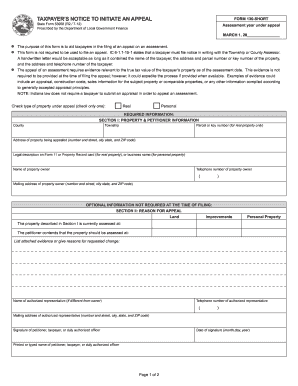
This guide provides users with clear and comprehensive instructions on how to complete the Forms In Gov Download Aspx Id 6979 online. By following these steps, users can effectively file an appeal regarding property assessments.
Follow the steps to fill out your form online easily.
- Press the ‘Get Form’ button to obtain the form and open it in your online editor.
- In the 'Assessment year under appeal' section, enter the year of the assessment being contested, marked by 'MARCH 1, 20_______________'.
- Select the type of property under appeal by checking either 'Real' or 'Personal'.
- Complete 'Section I' with the property and petitioner information. This includes the county, township, parcel or key number (for real property), and the address of the property being appealed.
- Provide the legal description of the property or business name in the appropriate field. Enter the name and contact information of the property owner, including their mailing address.
- In 'Section II,' note your reason for appeal by indicating whether it relates to land improvements or personal property. Fill out the current assessed value and the value you contend should be assessed.
- List any evidence or reasons for the requested change in valuation, and provide the name and contact information of any authorized representative, if applicable.
- Remember to sign the form, add the date of signature, and print or type your name in the designated area.
- After completing the form, you can save your changes, download a copy, print the form, or share it as necessary.
Start filling out your Forms In Gov Download Aspx Id 6979 online today to initiate your appeal.
You will receive notice of your property's value in one of two ways: the county assessor may send you a notice of assessment, known as a Form 11. Otherwise, the assessed value of your property can be found on your tax bill. This document is known as the TS-1 tax comparison statement.