Loading
Get Treatment Authorization Form - Edward
How it works
-

Open form follow the instructions
-

Easily sign the form with your finger
-

Send filled & signed form or save
How to fill out the TREATMENT AUTHORIZATION FORM - Edward online
Filling out the Treatment Authorization Form is a vital step in ensuring that you receive the necessary attention and care. This guide will provide comprehensive instructions on how to complete the form accurately and effectively online.
Follow the steps to complete the form accurately and securely.
- Click ‘Get Form’ button to obtain the form and open it in the editor.
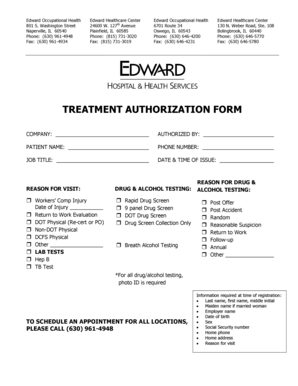
- Begin by entering the company name in the designated field to identify the organization associated with the treatment authorization.
- Fill in the 'Authorized By' section with the name of the individual who is authorizing the treatment.
- Provide the patient's name clearly in the 'Patient Name' field to ensure proper identification.
- Indicate a contact number for the patient in the 'Phone Number' section.
- Enter the job title of the patient to provide context regarding their role.
- Fill in the 'Date & Time of Issue' to track when the authorization was completed.
- State the reason for the visit in the corresponding section, outlining the purpose of the consultation.
- Select the appropriate reason for drug and alcohol testing, if applicable, by checking the relevant box.
- Complete the 'LAB TESTS' section by checking the tests that apply to the patient, ensuring to include any required testing.
- In the 'Reason for Drug & Alcohol Testing' section, select the reason for testing that applies to the patient's situation.
- Remember to note that a photo ID will be required for all drug and alcohol testing to adhere to regulations.
- Once all sections are completed, review the information for accuracy before proceeding to save the document.
- Save changes, download the form, print it, or share it as necessary, following the instructions provided in the editor.
Complete and submit your documents online today for a seamless experience.
You can also send them to Edward HIM/Medical Records Department, 801 S. Washington Street, Naperville, IL 60540, fax to 331-221-2390 or email to mychart.activation@eehealth.org.
Industry-leading security and compliance
US Legal Forms protects your data by complying with industry-specific security standards.
-
In businnes since 199725+ years providing professional legal documents.
-
Accredited businessGuarantees that a business meets BBB accreditation standards in the US and Canada.
-
Secured by BraintreeValidated Level 1 PCI DSS compliant payment gateway that accepts most major credit and debit card brands from across the globe.