Loading
Get Drive-by Bpo
How it works
-

Open form follow the instructions
-

Easily sign the form with your finger
-

Send filled & signed form or save
How to fill out the Drive-by BPO online
Filling out the Drive-by BPO form is a crucial step for those involved in property appraisal and analysis. This guide provides clear and detailed instructions to help users complete the form accurately and efficiently.
Follow the steps to effectively complete the Drive-by BPO form.
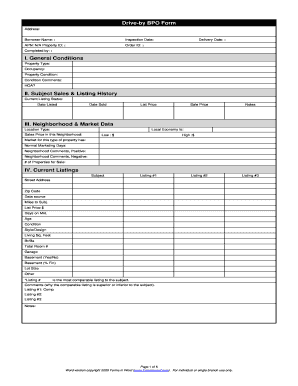
- Press the ‘Get Form’ button to access the Drive-by BPO form and open it in your preferred online document editor.
- Begin by filling in the address of the property for analysis. Make sure to provide accurate and complete information.
- Enter the borrower's name, inspection date, property ID, and the delivery date as specified. These fields are essential for tracking the appraisal process.
- In the General Conditions section, select the property type and occupancy status. Include comments regarding the property condition, and indicate if there is a homeowners association (HOA).
- For Subject Sales & Listing History, provide the current listing status, and record the date the property was listed and sold along with listing and sale prices, and any relevant notes.
- Complete the Neighborhood & Market Data section by defining the location type and local economy. Input sales prices in the neighborhood along with market conditions and comments on both positive and negative aspects.
- In the Current Listings section, list the properties that are comparable to the subject property. Fill in the necessary details such as street address, list price, and conditions.
- Under Recent Sales, provide details about properties sold nearby, including their sale prices, list prices, and any necessary notes justifying adjustments made.
- In the Marketing Strategy section, describe the 'as-is' and 'repaired' values of the property, and provide any suggestions for list price based on your analysis.
- Fill out the Repair Addendum with estimated costs for necessary repairs to the property and provide a total estimated repair cost if applicable.
- Upload and include images of the property in the Property Images section, indicating their suggested list and sale prices.
- Review all sections for accuracy and completeness. Once satisfied, save the changes, and choose to download, print, or share the completed form.
Complete your Drive-by BPO online today and ensure you have a well-prepared document for your appraisal needs.
The accuracy of a Drive-by BPO depends on several factors, including the quality of data used and the experience of the person performing the assessment. While Drive-by BPOs can provide a reliable estimate of a property's value, they may not be as precise as full appraisals due to their limited scope. It's important to consider this when relying on a BPO for important financial decisions.