Loading
Get Canada T5013 Sch 50 E 2017-2026
How it works
-

Open form follow the instructions
-

Easily sign the form with your finger
-

Send filled & signed form or save
How to fill out the Canada T5013 SCH 50 E online
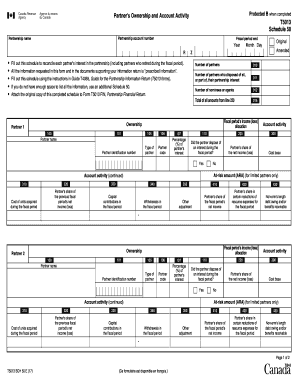
The Canada T5013 SCH 50 E form is essential for reconciling each partner's interest in a partnership. This guide provides a clear step-by-step approach to ensure that users can complete the document accurately and efficiently online.
Follow the steps to complete the Canada T5013 SCH 50 E effectively.
- Click ‘Get Form’ button to download the document and access it for editing.
- Enter the partnership account number in the designated field, ensuring the number is accurate as it identifies your partnership.
- Fill in the partnership name clearly, as this represents the legal entity involved.
- Specify the fiscal period end by selecting the appropriate year and date, which is critical for tax reporting.
- Indicate if this form is amended by marking the appropriate checkbox. This applies if there were previous submissions needing corrections.
- Input the total number of partners in the partnership, as well as any partners who have disposed of all or part of their interest.
- List the partners by entering their identification number, name, and percentage of the partner's interest for each partner in the provided fields.
- Fill in partner-specific details, such as type of partner, cost of units acquired, and share of net income or loss for that fiscal period.
- If applicable, indicate any capital contributions or withdrawals during the fiscal period for each partner.
- Review all entered information for accuracy. If additional partners need to be added, consider using an extra Schedule 50 form.
- Once all details are completed, save changes, then proceed to download, print, or share the form as needed.
Complete your Canada T5013 SCH 50 E form online today to ensure accurate reporting.