Loading
Get Tn Sos Ss-4270 2014-2026
How it works
-

Open form follow the instructions
-

Easily sign the form with your finger
-

Send filled & signed form or save
How to fill out the TN SOS SS-4270 online
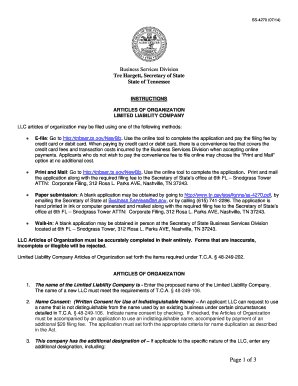
Filling out the TN SOS SS-4270 form is an essential step in establishing a limited liability company in Tennessee. This guide will provide you with clear, step-by-step instructions to ensure that the process is straightforward and efficient, regardless of your prior experience with legal documents.
Follow the steps to successfully complete your form online
- Click ‘Get Form’ button to access the form and open it in the editor.
- Enter the name of your limited liability company in the designated field. Ensure it complies with Tennessee law by including 'Limited Liability Company' or its abbreviation.
- If applicable, check the box for name consent if your chosen name is not distinguishable from an existing business. Remember to include the required additional application.
- If relevant, input any specific designation for your company, such as 'Non-Profit' or 'Professional LLC.'
- Provide the complete name and address of the initial registered agent. Ensure the address conforms to USPS deliverability standards.
- Indicate the month closing your fiscal year. If left blank, it will default to December.
- If the starting date of your company is intended to be future-dated, enter that date here, ensuring it does not exceed 90 days from filing.
- Select whether your LLC will be Member Managed, Manager Managed, or Director Managed by clicking the appropriate box.
- Enter the number of members at the time of filing. If omitted, the default will be one member.
- Indicate whether the LLC will operate perpetually or specify an end date if applicable.
- Enter the principal executive office's complete address in Tennessee, ensuring it meets USPS standards.
- If needed, provide a different mailing address for the entity. Ensure it is also USPS deliverable.
- If your LLC is a Non-Profit, Professional LLC, or Series LLC, make sure to check the relevant box and provide any required details.
- Acknowledge if your LLC is prohibited from doing business in Tennessee by checking the appropriate box.
- Include any other provisions that you find relevant to your LLC in the designated area or indicate 'see attached' if additional space is needed.
- Sign and date the form, ensuring to type or print your name and capacity in any necessary sections.
- After reviewing your form for completeness and accuracy, save your changes, and proceed to download, print, or share the completed form.
Start completing your TN SOS SS-4270 form online today for a seamless business setup.