Loading
Get Nc Mvr-16a (formerly Mvr-16aa) 2020-2026
How it works
-

Open form follow the instructions
-

Easily sign the form with your finger
-

Send filled & signed form or save
How to fill out the NC MVR-16A (Formerly MVR-16AA) online
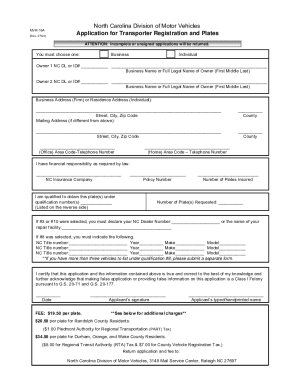
The NC MVR-16A form is essential for individuals and businesses applying for transporter registration and plates in North Carolina. This guide provides clear and detailed instructions to help users fill out this form accurately and efficiently online.
Follow the steps to complete the NC MVR-16A form effectively.
- Click the ‘Get Form’ button to obtain the form and open it in the editor.
- Select the appropriate category as either 'Business' or 'Individual' at the beginning of the form.
- Enter the owner’s North Carolina Driver License (DL) or ID number and the full legal name for both Owner 1 and Owner 2 if applicable.
- Provide the business address for firms or the residence address for individuals, including street, city, and zip code.
- If different, fill in the mailing address and its corresponding county.
- Input your area code and telephone number for both office and home contacts.
- Indicate your financial responsibility by naming your NC Insurance Company and entering the policy number.
- If applicable, list your qualification number(s) as required.
- Specify the number of plates requested and the number of plates insured.
- If you have selected qualification options #3 or #10, provide your NC dealer number or the name of your repair facility.
- For qualification #8, list the NC title number, year, make, and model for up to three vehicles. If there are more, note that a separate form must be submitted.
- Certify the information by signing and dating the application, confirming that all provided details are accurate to the best of your knowledge.
- Finally, submit the completed form along with the fee to the specified address. You can then save changes, download, print, or share the form.
Complete your NC MVR-16A form online today for a streamlined application process.