MA TRINITY TULARE TUOLUMNE VENTURA YOLO YUBA NO Small Business & DVBE Certification Application, 812 (Rev. 12/2012) 3. APPLICANT’S OWNERSHIP Page 2 ATTACH ADDITIONAL PAPER IF NECESSARY ENTER THE NAMES AND COMPLETE HOME ADDRESSES OF ALL OWNERS, SHAREHOLDERS AND/OR OFFICERS OF THE APPLICANT BUSINESS. WHEN ANOTHER BUSINESS IS AN OWNER, ENTER THE COMPLETE PRINCIPAL OFFICE ADDRESS OF THE PARENT COMPANY IN THE HOME ADDRESS BOX. CORPORATIONS: IDENTIFY ALL CORPORATE OFFICERS [PRESIDENT, VICE P.
Loading

Open form follow the instructions

Easily sign the form with your finger

Send filled & signed form or save
How to fill out the CA DGS 812 online
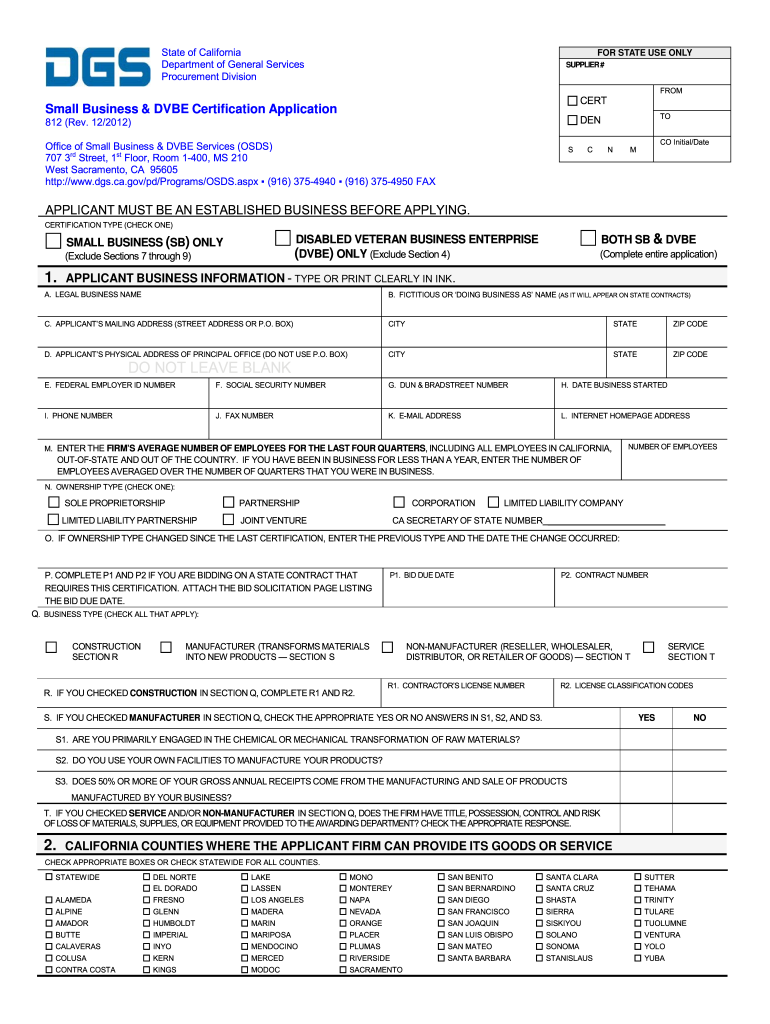
Filling out the CA DGS 812 form for small business and disabled veteran business enterprise certification can appear daunting. This guide provides clear, step-by-step instructions to help users complete the form accurately and efficiently.
Follow the steps to successfully complete the CA DGS 812 form online.
- Click ‘Get Form’ button to access the CA DGS 812 form and open it in the editor.
- Review the certification type options at the top of the form. Select the appropriate box to indicate whether you are applying as a small business only, a disabled veteran business enterprise, or both.
- Complete the applicant business information section. Ensure you provide the legal business name, fictitious name (if applicable), mailing address, and physical address of the principal office. All fields must be filled out clearly without leaving blanks.
- Provide the federal employer identification number, social security number, DUN & Bradstreet number, business start date, phone number, fax number, email address, and the internet homepage address.
- Indicate the average number of employees for the last four quarters. If your business has been in operation for less than a year, average the number of employees for the quarters you were active.
- Select the ownership type that corresponds to your business. Check one of the options: sole proprietorship, partnership, corporation, limited liability company, etc.
- If your ownership type has changed, note the previous type and date of the change if applicable.
- Complete sections regarding business type and relevant classifications by selecting the applicable checkboxes.
- In the ownership section, list all owners or shareholders, providing complete names, titles, ownership percentages, home addresses, and indicate if they are disabled veterans.
- Answer the questions in the affiliations section regarding any relationships with other businesses.
- Fill out the gross annual receipts table as per your business tax information. Use the correct lines from the specified federal forms for your entity type.
- Complete the keywords section by entering terms that describe your business. This will help improve visibility in searches that state buyers may conduct.
- For disabled veteran business enterprise applicants, answer the managerial control questions and provide any necessary information demonstrating qualifying ownership.
- Review the entire form for accuracy and completeness. Once you have confirmed that all sections are filled properly, you can save your changes, download, print, or share the form as needed.
Complete your certification documents online today to start benefiting from the opportunities available to small businesses and disabled veteran business enterprises.
Experience a faster way to fill out and sign forms on the web. Access the most extensive library of templates available.
Related content
Check at least one below. Renewal applications should only be submitted within 90 days...
Aug 21, 2025 — Description of Work: Project is located at the UC Davis Medical Center in...
The IP 267 intelligent I/O module generates programmable pulse trains for driving the...
Get answers to your most pressing questions about US Legal Forms API.
How often do you file a statement of Information for a corporation in California?
In California, corporations must file a Statement of Information every year or every two years, depending on their specific filing cycle. It's essential to check your organization’s requirements to comply with CA DGS 812. Timely filing helps maintain good standing and ensures you receive important updates from the state.
How do I file a statement of Information for an S Corp?
To file for an S Corp, you need to complete the specific Statement of Information form designated for S Corporations. Access this form through the California Secretary of State's website and keep CA DGS 812 in mind for detailed instructions. Once completed, submit the form online or via mail, along with any required fees.
Can you file CA statement of Information online?
Yes, you can file the CA Statement of Information online. The California Secretary of State's website offers a user-friendly platform for completing this process. When you refer to CA DGS 812, you’ll find the guidelines necessary to ensure your submission is correct. This online option saves you time and provides instant confirmation of your filing.
How to file a complaint with the California Public Utilities Commission?
To file a complaint with the California Public Utilities Commission, start by outlining your issue clearly. You can submit your complaint through their official website or by mailing it directly to their office. Referencing CA DGS 812 may provide further insights into the process, improving your chances of resolution.
How to file a complaint against a fiduciary in California?
To file a complaint against a fiduciary in California, you first need to gather relevant evidence and documents. Then, you should submit your complaint to the California Department of Consumer Affairs, outlining the fiduciary's actions. Ensure to check any specific requirements related to CA DGS 812 to enhance your complaint’s validity.
What is the SB100 exemption in California?
The SB100 exemption in California allows for certain entities to be excluded from compliance under specific conditions. This could involve entities that are transitioning away from non-renewable sources or those facing unique challenges in meeting the goals. It’s essential to carefully review the regulations to determine eligibility for any exemptions. Information from CA DGS 812 can provide insights into these nuances.
What are the requirements for SB100 in California?
Requirements for SB100 in California include ensuring that your energy sources are entirely renewable by 2045 and reducing the carbon footprint. The legislation mandates the state to source energy from only clean and renewable resources, which may involve extensive planning and investment. Understanding these requirements thoroughly is crucial, and referring to CA DGS 812 can aid both individuals and businesses in navigating this landscape.
How to get SB100 in California?
To get SB100 in California, you need to understand its specific criteria and initiatives focused on renewable energy. Engaging with programs and regulations outlined under CA DGS 812 can provide guidance on how to comply with SB100 requirements. Moreover, participating in community initiatives can help you align your energies with the state's objectives. Making informed decisions now can contribute to future sustainability.
How do I get a P endorsement in California?
To obtain a P endorsement in California, you must complete the required training and pass a background check. This process typically involves specific coursework, particularly in safety and transportation regulations. After fulfilling these requirements, you can apply for the endorsement through the California Department of Motor Vehicles. Consider referencing CA DGS 812 for comprehensive information on fulfilling the endorsement criteria.
How to get a general engineering contractor's license in California?
To obtain a general engineering contractor's license in California, you must meet specific requirements, including having relevant experience and passing a licensing exam. You'll need to show proof of your work history and carefully submit your application to the Contractors State License Board. Completion of training or courses related to engineering can also be beneficial. Utilizing resources from CA DGS 812 can provide guidance on the licensing process.
Use professional pre-built templates to fill in and sign documents online faster. Get access to thousands of forms.
If you believe that this page should be taken down, please follow our DMCA take down process here.