Loading
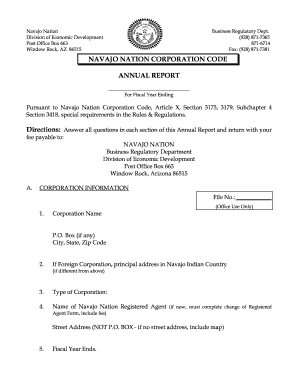
Get Az Navajo Nation Corporation Code Annual Report
How it works
-

Open form follow the instructions
-

Easily sign the form with your finger
-

Send filled & signed form or save
How to fill out the AZ Navajo Nation Corporation Code Annual Report online
Filling out the AZ Navajo Nation Corporation Code Annual Report is essential for ensuring your corporation's compliance. This guide provides step-by-step instructions to assist you in completing the form accurately and efficiently.
Follow the steps to complete your annual report online.
- Click ‘Get Form’ button to access the AZ Navajo Nation Corporation Code Annual Report and open it in the editor.
- Begin by entering your corporation information in Section A. Fill out the file number (for office use only), corporation name, and the P.O. Box, city, state, and zip code. If your corporation is foreign, provide the principal address in Navajo Indian Country if it differs from the above.
- Indicate the type of corporation you're filing for and provide the name of the registered agent for the corporation. Ensure you include a street address; if there is none available, you may need to provide a map.
- Specify the fiscal year end date for your corporation.
- In Section B, provide a brief statement outlining the nature of the business that your corporation engages in within Navajo Indian Country.
- Complete Section C regarding capitalization. Here, provide the number of shares, class, series, par value per share, and a statement on whether shares have par value.
- List shareholders holding more than 20% of any class of shares in Section D. Include their names, and if there are additional shareholders, attach a separate sheet. If none exist, please specify that clearly.
- For close corporations, Section F requires you to list the name of the manager, their start date, street address, and date their term expires. Provide a P.O. Box and city, state, and zip code as necessary.
- In Sections G and H, list all officers and directors of your corporation, including their addresses and dates of office commencement and expiration. Additional sheets can be attached if necessary.
- Moving to Section I, complete the balance sheet by listing all assets and liabilities. If no business was conducted during the fiscal year, clearly state this.
- If applicable, complete Section J for agricultural cooperatives, providing required details such as the association's name, place of business, business operations, and financial information.
- Finally, sign the declaration in Section K. Ensure that the report is accurate and complete, and remember to include the filing fee of $25.00 payable to the Navajo Nation, Business Regulatory Department.
- Save your changes, and then download, print, or share the completed form as needed.
Ensure compliance by completing your AZ Navajo Nation Corporation Code Annual Report online today.
To register with the Navajo Nation, you must complete the appropriate registration forms and submit them along with any required documentation. This process ensures your business complies with the AZ Navajo Nation Corporation Code Annual Report regulations. Platforms like uslegalforms provide templates and support to guide you through this registration efficiently.