Loading
Get Certificate Of Medical Neccessity Cms-846-pneumatic Compression Devices
How it works
-

Open form follow the instructions
-

Easily sign the form with your finger
-

Send filled & signed form or save
How to fill out the Certificate Of Medical Necessity CMS-846-Pneumatic Compression Devices online
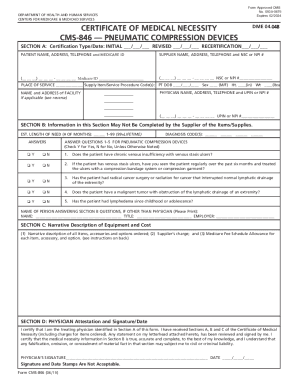
Filling out the Certificate Of Medical Necessity CMS-846 for Pneumatic Compression Devices is a vital step in ensuring that patients receive the necessary equipment. This guide provides clear instructions to help you accurately complete the form online.
Follow the steps to complete the form effectively.
- Press the ‘Get Form’ button to access the Certificate Of Medical Necessity CMS-846 online and open it in your preferred editor.
- Begin with Section A, where you will identify the certification type by choosing 'Initial', 'Revised', or 'Recertification' and enter the corresponding dates. Provide the patient’s name, address, telephone number, and Medicare ID as it appears on their card.
- Fill in the supplier's information, including the supplier name, address, telephone number, and either the NSC or NPI number, formatted correctly with the appropriate qualifiers.
- Indicate the place of service by selecting the proper code representing where the equipment is to be used—such as patient’s home or a skilled nursing facility.
- Complete the supply item/service procedure code field by listing all relevant procedure codes for the ordered items.
- Input the patient’s date of birth, gender, height in inches, and weight in pounds in the provided fields.
- Enter the name and contact details for the treating physician, including their UPIN or NPI number.
- Move to Section B, where non-physician clinicians may provide details after ensuring the physician will review and sign off. Here, estimate the length of need for the equipment (in months) and enter the relevant diagnosis codes.
- Answer the five medical necessity questions regarding the patient's condition, marking each with 'Y' for Yes or 'N' for No.
- If applicable, print the name and title of the person answering the questions in Section B, including the employer's name.
- In Section C, the supplier will provide a narrative description of the ordered equipment, the charge, and the Medicare fee schedule allowance.
- Finally, in Section D, ensure the physician signs and dates the document, certifying that the information is accurate and complete.
- Once all sections are completed, you can save the changes, download, print, or share the form as needed.
Complete your Certificate Of Medical Necessity CMS-846 online to ensure timely access to necessary medical equipment.
Get form
Experience a faster way to fill out and sign forms on the web. Access the most extensive library of templates available.
The appliance(s) and any other accessories, options and supplies used with PCD E0676 are included in the payment for HCPCS code E0676 at the time of initial issue and must not be billed separately to Medicare.
Get This Form Now!
Use professional pre-built templates to fill in and sign documents online faster. Get access to thousands of forms.
Industry-leading security and compliance
US Legal Forms protects your data by complying with industry-specific security standards.
-
In businnes since 199725+ years providing professional legal documents.
-
Accredited businessGuarantees that a business meets BBB accreditation standards in the US and Canada.
-
Secured by BraintreeValidated Level 1 PCI DSS compliant payment gateway that accepts most major credit and debit card brands from across the globe.