Loading
Get Gsa 7661 2018-2026
How it works
-

Open form follow the instructions
-

Easily sign the form with your finger
-

Send filled & signed form or save
How to fill out the GSA 7661 online
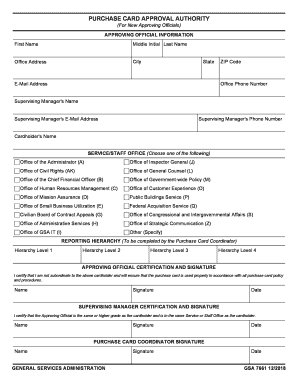
Filling out the GSA 7661 form accurately is essential for obtaining purchase card approval authority. This guide provides step-by-step instructions to help you navigate the online form with ease.
Follow the steps to successfully complete the form.
- Press the ‘Get Form’ button to access the form. This will open it in an online editor to begin your completion process.
- In the 'Approving Official Information' section, provide your first name, middle initial, and last name. Next, enter your office address, city, state, and ZIP code.
- Fill in your office phone number and your email address. Then, provide the name of your supervising manager along with their phone number and email address.
- Input the cardholder's name in the specified field to identify the individual associated with the purchase card.
- Select the appropriate service or staff office from the list provided. Options range from the Office of the Administrator to Other (Specify). Ensure to choose the correct one for your role.
- The 'Reporting Hierarchy' section is to be completed by the Purchase Card Coordinator. They will enter hierarchy levels 1 through 4 as needed.
- In the 'Approving Official Certification and Signature' section, confirm that you are not subordinate to the cardholder. Sign, print your name, and date the form.
- Next, the supervising manager must certify that the approving official is of equal or higher grade than the cardholder and in the same service or staff office. They should also provide their signature, printed name, and date.
- Lastly, the Purchase Card Coordinator needs to provide their name, then sign and date the form to finalize the submission.
- After completing all sections, you can save your changes, download the form, print it, or share it as necessary.
Complete your GSA 7661 form online today to streamline your purchase card approval process.
Related links form
U.S. General Services Administration. Southeast Sunbelt Region. GSA Region 4 Federal Acquisition Service. Story Book. Military.