Loading
Get Gsa 3683a 2018-2026
How it works
-

Open form follow the instructions
-

Easily sign the form with your finger
-

Send filled & signed form or save
How to fill out the GSA 3683A online
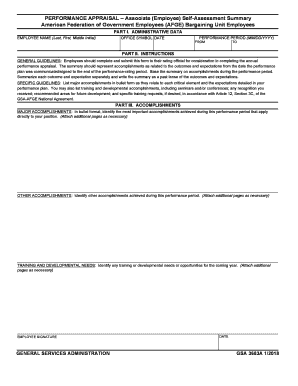
Filling out the GSA 3683A form is an essential step for employees to summarize their accomplishments during the performance period. This guide provides a clear, step-by-step approach to help you successfully complete the form online.
Follow the steps to accurately complete the GSA 3683A form.
- Click ‘Get Form’ button to obtain the form and open it in the editor.
- In the 'Administrative Data' section, enter your name in the format 'Last, First, Middle Initial'. Next, fill in the office symbol and the date of completion. Specify the performance period by entering the start and end dates in MM/DD/YYYY format.
- Proceed to 'Part II: Instructions'. Carefully review the general guidelines provided. This section advises on how to summarize accomplishments based on your performance plan.
- In the 'Accomplishments' section, start with 'Major Accomplishments'. List your most significant achievements in bullet form as they relate to the critical elements defined in your performance plan, ensuring you focus on the past performance period.
- Next, fill out the 'Other Accomplishments' section. Identify any additional achievements that do not fit into the major accomplishments category. Again, utilize bullet points for clarity.
- In the 'Training and Developmental Needs' section, note any identified training needs or developmental opportunities that are pertinent for the upcoming year. Bullet points are also recommended here.
- Lastly, sign and date the form in the 'Employee Signature' section to validate your self-assessment before submission.
- Review all entered information for accuracy. Once completed, you can save changes, download, print, or share the form as needed.
Begin filling out the GSA 3683A online to ensure your performance achievements are accurately documented.