Loading
Get Vt Dmv Vl-18 2016
How it works
-

Open form follow the instructions
-

Easily sign the form with your finger
-

Send filled & signed form or save
How to fill out the VT DMV VL-18 online
Filling out the VT DMV VL-18 form online is a straightforward process essential for obtaining an enhanced driver license or ID card. This guide will walk you through each step, ensuring you have the necessary information to complete the form accurately.
Follow the steps to complete the VT DMV VL-18 form online.
- Click the ‘Get Form’ button to access the VT DMV VL-18 form. This action will enable you to open the form and begin filling it out.
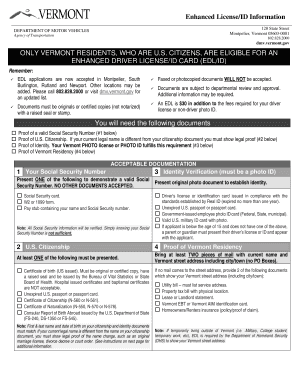
- Provide proof of a valid social security number. Acceptable documents include your social security card, a W2 or 1099 form, or a pay stub displaying your name and social security number. Remember, knowing your social security number is not sufficient.
- Submit proof of U.S. citizenship. You may present a certificate of birth, an unexpired U.S. passport, or any other acceptable documentation that clearly establishes your citizenship status.
- Demonstrate your identity by providing an original photo ID, such as a driver’s license or a government-issued photo ID card. Ensure it complies with the accepted standards.
- Establish your Vermont residency. Submit two pieces of mail with your current name and street address. Options include utility bills, property tax bills, or a lease agreement.
- If your legal name differs from the documents provided, include proof of the name change, such as a marriage license, court order, or divorce decree.
- Once all fields are completed and all documentation is ready, review your entry carefully. Make any necessary adjustments before final submission.
- Finally, save your changes, download, print, or share the completed form as needed, ensuring you retain copies as appropriate.
Get started on your VT DMV VL-18 form today and complete your documents online!
Get form
Experience a faster way to fill out and sign forms on the web. Access the most extensive library of templates available.
Related links form
REAL ID-compliant cards are marked with a star at the top of the card. If you're not sure, look at the upper-righthand corner of your license. If your Vermont license has a circle with a star in it in the upper-righthand corner, it is Real ID compliant.
Get This Form Now!
Use professional pre-built templates to fill in and sign documents online faster. Get access to thousands of forms.