Loading
Get Depredation Permit Application
How it works
-

Open form follow the instructions
-

Easily sign the form with your finger
-

Send filled & signed form or save
How to fill out the Depredation Permit Application online
Filling out the Depredation Permit Application online can be a straightforward process if you follow the correct steps. This guide is designed to assist users in completing the application efficiently and accurately.
Follow the steps to complete your online application.
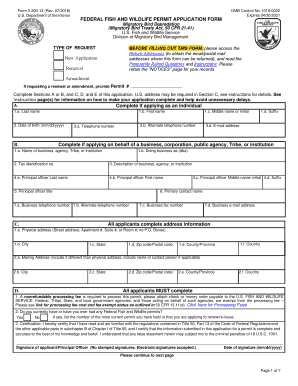
- Click ‘Get Form’ button to obtain the form and open it in the editor.
- Select the type of request by choosing from options such as New Application, Renewal, or Amendment. If applicable, provide the Permit number for renewals or amendments.
- Complete either Section A or B based on whether you are applying as an individual or on behalf of a business, corporation, public agency, Tribe, or institution. Fill out the relevant fields including names, contact information, and organizational details.
- In Section C, provide your complete address information. This includes your physical address, mailing address (if different), and any additional contact information.
- Complete Section D where all applicants must acknowledge the nonrefundable processing fee and certify that you understand the regulations pertaining to the application.
- Complete Section E, which includes questions about the nature of the depredation, previous efforts taken, and details required for specific species. Be thorough in your responses to avoid delays.
- In the Attachments section, include required documents such as the Wildlife Services Permit Review Form (Form 37), any records documenting previous deterrent measures, and a Take Request Table detailing the species and methods of take.
- Review all completed sections and confirm that all required information is filled out. Ensure accuracy to avoid delays in processing.
- Once all sections are complete, save your changes, and proceed to download, print, or share the form as necessary to submit your application.
Begin your application process online today and ensure you have all necessary documentation ready for submission.
The permit may be obtained online at https://ar-web.s3licensing.com, at any license vendor or by calling 800-364-4263. It can be added as a code to your existing license or obtained on its own.