Loading
Get Ontario Form 14c 2018-2026
How it works
-

Open form follow the instructions
-

Easily sign the form with your finger
-

Send filled & signed form or save
How to fill out the Ontario Form 14C online
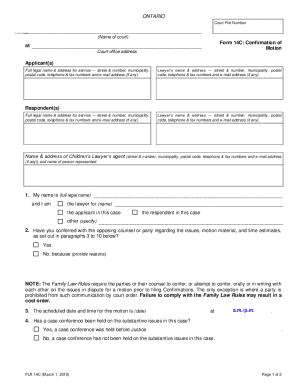
Filling out the Ontario Form 14C, which serves as a confirmation of motion, is a key step in the legal process for individuals involved in court proceedings. This guide provides clear, step-by-step instructions on how to complete this form effectively online, ensuring users understand each section and field.
Follow the steps to fill out the Ontario Form 14C online
- Click ‘Get Form’ button to obtain the form and open it in the editor.
- Provide your court file number at the top of the form, ensuring it's accurate to facilitate proper filing.
- Fill out the applicant(s) section with the full legal name and address for service, including street number, municipality, postal code, and contact information.
- Complete the respondent(s) section with their full legal name and address for service, mirroring the details required for the applicant.
- If applicable, enter the name and address of the Children’s Lawyer’s agent, including their contact details.
- In section 1, specify your name and role by selecting one of the options: lawyer for, applicant in, respondent in, or other. Fill in the necessary names accordingly.
- Answer question 2 regarding conferring with opposing counsel or party about the motion. Choose 'Yes' or 'No' and provide reasoning if applicable.
- State the scheduled date and time for the motion in section 3, ensuring to specify a.m. or p.m.
- Respond to question 4 concerning whether a case conference has been held and include the name of the Justice if applicable.
- Complete section 5 by naming the case management judge for your case.
- Indicate in section 6 whether the matter is going ahead on specified issues, for a consent order, or being adjourned. Fill in additional information as required.
- List specific orders you are seeking in section 7, using bullet points for clarity.
- Confirm your intent to bring a draft order to the motion in section 8.
- Refer to any pages or tabs that the presiding judge will need in section 9.
- Estimate the time required for the motion for both the applicant and the respondent in section 10, ensuring to total the minutes.
- Finally, remember to sign and date the document before submission.
Complete your Ontario Form 14C online today for a smoother filing experience.