Loading
Get Au B144 2019-2026
How it works
-

Open form follow the instructions
-

Easily sign the form with your finger
-

Send filled & signed form or save
How to fill out the AU B144 online
This guide provides clear, step-by-step instructions on how to complete the AU B144 form online for the return of seized goods. Whether you are familiar with legal documents or new to the process, this guide offers comprehensive support.
Follow the steps to successfully complete the AU B144 form.
- Click ‘Get Form’ button to obtain the form and open it in the editor. This will allow you to begin filling out the necessary information online.
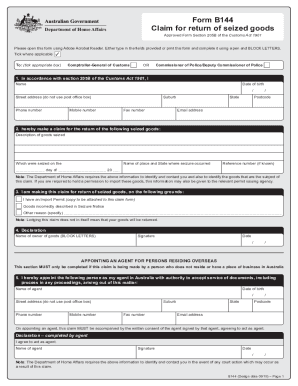
- Begin by entering your personal details in the specified fields. Include your name, date of birth, street address (avoid using a post office box), suburb, state, and postcode. Also provide your mobile number, phone number, fax number, and email address.
- In this section, specify the seized goods for which you are making a claim. Provide a detailed description of the goods, the date of seizure, and the name of the place and state where the seizure occurred. If you have a reference number, include it as well.
- State the grounds for your claim. You have options to indicate if you possess an Import Permit (attach a copy), if the goods were incorrectly described in the Seizure Notice, or if you have another reason. Clearly specify your reasoning in the provided space.
- Complete the declaration section by writing your name in BLOCK LETTERS and signing the form. Include the date of your signature.
- If you are appointing an agent in Australia, complete the relevant section with the agent's details, including their name, date of birth, address, and contact information. This must be accompanied by the agent's written consent.
- Ensure the agent signs and dates the declaration confirming their agreement to act on your behalf.
- Once all sections are completed, review your form for accuracy. Save your changes, and choose to download, print, or share the form as necessary.
Complete the AU B144 form online today to take the next steps in your claim.