Loading
Get Gsa 1390b 2006-2026
How it works
-

Open form follow the instructions
-

Easily sign the form with your finger
-

Send filled & signed form or save
How to fill out the GSA 1390B online
Filling out the GSA 1390B form is an essential task for managing postal resources within an organization. This guide will walk you through the necessary steps to successfully complete the form online, ensuring accuracy and compliance.
Follow the steps to fill out the GSA 1390B efficiently.
- Click ‘Get Form’ button to obtain the form and open it in the editor.
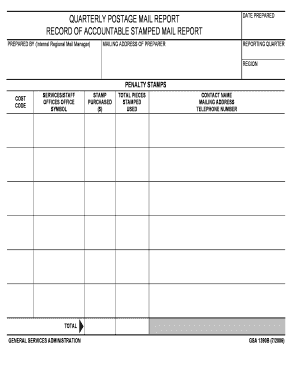
- Begin by entering your name in the 'Prepared by' field, typically the name of the internal regional mail manager responsible for the report.
- Next, provide your mailing address in the designated area to ensure proper identification and contact.
- Then, input the date prepared in the relevant field, indicating when the report was completed.
- Now, select the reporting quarter from the options available to specify the time frame of the report.
- Enter your region in the appropriate section to indicate the geographic area covered by the report.
- Fill in the penalty stamps used for the quarter along with the associated costs for clarity on expenditures.
- Record the cost code associated with the stamps to ensure departmental accuracy in budgeting.
- List the services or staff offices in the designated field, ensuring all relevant offices are accounted for.
- Next, indicate the number of stamps purchased and the total pieces stamped used within the quarter.
- Provide the contact name, mailing address, and telephone number of the person responsible for follow-up inquiries, ensuring ease of communication.
- Finally, review all fields for accuracy before saving changes, and choose to download, print, or share the form as needed.
Complete your documents online today for efficient management!