Loading
Get Insurance Policy Card
How it works
-

Open form follow the instructions
-

Easily sign the form with your finger
-

Send filled & signed form or save
How to fill out the Insurance Policy Card online
Completing your Insurance Policy Card online can streamline your record-keeping and simplify the management of your insurance details. This guide will lead you through each section, ensuring you provide all necessary information accurately and efficiently.
Follow the steps to complete your Insurance Policy Card online.
- Click ‘Get Form’ button to obtain the form and open it in the editor.
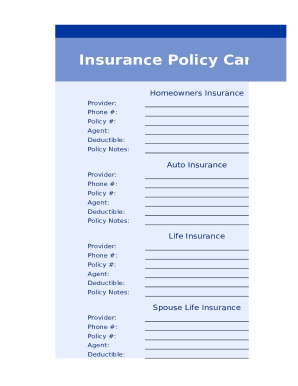
- Begin with the homeowners insurance section. Fill in the provider's name, the phone number for contact, your policy number, the agent's name, the deductible amount, and any relevant policy notes.
- Next, move on to the auto insurance section. Similar to the previous section, input the provider's name, contact phone number, policy number, name of the agent, the deductible, and any applicable policy notes.
- Proceed to the life insurance section. Here, enter the provider's details, their phone number, your policy number, the agent's name, the deductible, and noteworthy policy notes relevant to this insurance.
- Lastly, fill in the spouse life insurance section. Provide the necessary details such as the provider's name, policy number, agent information, and deductible. If there are any policy notes, make sure to add them here as well.
- After completing all sections, review your entries to ensure accuracy. Once you are satisfied, save your changes, and choose to download, print, or share the completed Insurance Policy Card as needed.
Take a step toward organized insurance management by completing your Insurance Policy Card online.
Your proof of insurance which shows details about your auto insurance policy. It's easy to get, as it is mailed to you by the carrier, you can print it on your own, or show it on your phone, and can help you out whether you're trying to register a vehicle, you're in an accident, or you get pulled over.