PRELIMINARY AUTHORIZATION TO PROVIDE MEDICAID WAIVER SERVICES NORTH DAKOTA DEPARTMENT OF HUMAN SERVICES AGING SERVICESHOME AND COMMUNITY BASED SERVICESClear FieldsSFN 410 (72021)By accepting this.
Loading

Open form follow the instructions

Easily sign the form with your finger

Send filled & signed form or save
How to fill out the ND SFN 410 online
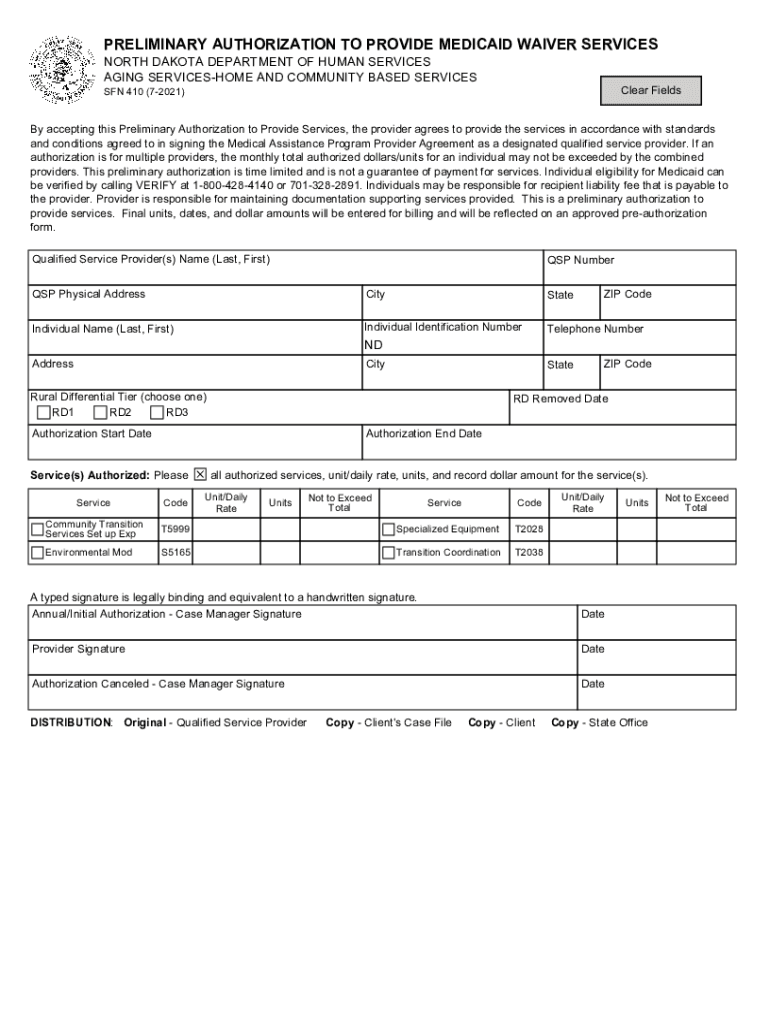
The ND SFN 410 form is essential for providers looking to offer Medicaid waiver services in North Dakota. This guide will walk you through the steps necessary to complete this form online, ensuring that you understand each section and field required for submission.
Follow the steps to accurately complete the ND SFN 410 online.
- Click the ‘Get Form’ button to access the ND SFN 410 online and open it in the designated editor.
- Begin by filling in the qualified service provider's name, physical address, city, and state. This information verifies who will be providing the services.
- Next, input the individual's name and identification number. Ensuring accuracy in this section is crucial as it relates to the recipient of the services.
- Enter the telephone number and address of the individual who will receive services, including the city, state, and ZIP code.
- Select the appropriate rural differential tier by choosing either RD1, RD2, or RD3 to determine the service parameters.
- Fill in the authorization start and end dates to specify the timeline for which services are approved.
- Detail the service(s) authorized, including the unit/daily rate, number of units, and total dollar amounts. Be sure to include all applicable services listed on the form.
- For each service, input the service code as outlined in the service descriptions provided to ensure proper categorization.
- Once all sections are completed, you will need to provide signatures. Enter the case manager's and provider's signatures along with the appropriate dates. Remember that a typed signature is legally binding.
- After reviewing all entries for accuracy, you can save your changes. The form may also be downloaded, printed, or shared as necessary.
Complete your ND SFN 410 form online today to facilitate expedited access to Medicaid waiver services.
Experience a faster way to fill out and sign forms on the web. Access the most extensive library of templates available.
Related content
AGING SERVICES-HOME AND COMMUNITY BASED SERVICES. SFN 410 (7-2021). By accepting this...
Items 1 - 14 — An applicant must take and pass the standardized General Educational...
The Guinness Book of Records lists 410 feature-length film and TV versions of William...
Use professional pre-built templates to fill in and sign documents online faster. Get access to thousands of forms.
If you believe that this page should be taken down, please follow our DMCA take down process here.