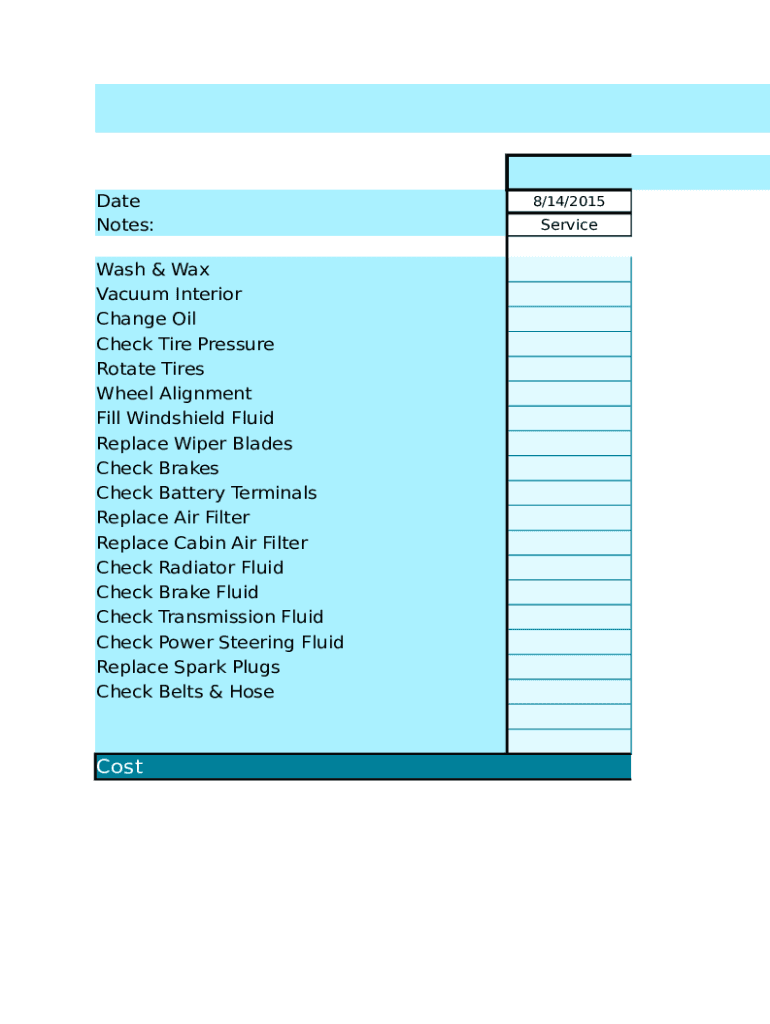
Date Notes: Wash & Wax Vacuum Interior Change Oil Check Tire Pressure Rotate Tires Wheel Alignment Fill Windshield Fluid Replace Wiper Blades Check Brakes Check Battery Terminals Replace Air Filter Replace.
Loading

Open form follow the instructions

Easily sign the form with your finger

Send filled & signed form or save
How to fill out the Vehicle Care Log online
The Vehicle Care Log is an essential tool for keeping track of your vehicle's maintenance and service history. This guide provides clear, step-by-step instructions to help you fill out the form accurately and efficiently.
Follow the steps to complete your Vehicle Care Log online
- Click the ‘Get Form’ button to access the Vehicle Care Log. This action will allow you to obtain the form and open it for editing.
- Start by entering the date for each service performed. This is an important record to track when maintenance tasks occurred.
- Next, record the mileage of the vehicle at the time of each service. This data helps you monitor the performance and needs of your vehicle over time.
- In the service section, list each maintenance task that has been completed. You may check off tasks such as 'wash & wax,' 'change oil,' or 'check tire pressure,' as applicable.
- For the cost of services, enter the amount spent on each maintenance task. Keeping track of costs is crucial for budgeting and expense management.
- Review your entries for accuracy, ensuring that all required information is complete and correct.
- Once you have filled out the form, you have options to save your changes, download a copy, print the form, or share it with others if needed.
Complete your Vehicle Care Log online to keep your vehicle maintained and running smoothly.
Experience a faster way to fill out and sign forms on the web. Access the most extensive library of templates available.
Related content
And, find out if there's a recall on your car or how to report a vehicle safety ... safety...
If you are claiming vehicle expense, you are using the standard mileage rate for 2017...
Get answers to your most pressing questions about US Legal Forms API.
How do I make a maintenance log for my car?
How to Keep a Vehicle Maintenance Log? Create a spreadsheet or document that includes your vehicle's relevant information. Make sure to include the vehicle's make, model, and year and your personal contact information. Include all the important details such as oil changes, tune-ups, and other maintenance needs.
What service should be done at 10000 miles?
Generally, by around 10,000 miles of running up and down, your vehicle is due for its first service maintenance. This initial service round is not really very demanding, and it usually just include the need for tire rotation, air filter, oil change and parts (cooling and brake systems) inspection.
How long should you keep auto repair receipts?
As stated above, the FMCSA requires these reports to be retained for 14 months. Even if you are not expecting a FMCSA audit in the near future, do not put off getting organized and implementing an effective Vehicle Maintenance Filing System.
What is a maintenance log?
An equipment maintenance log is a document that organizations use to record asset maintenance activities. It enables them to monitor their system checkup processes and track maintenance tasks performed by technicians, the exact time the tasks were performed, and each specific task's purpose.
What is the purpose of maintenance logs and charts and what items must be included?
Complete equipment maintenance logs include basic information about the item, as well as a list of all the preventative maintenance it has undergone. Committing to an equipment maintenance log to keep key players up to date with which asset is in good repair allows the company to make the most of each item.
What is the purpose of a maintenance log?
Maintenance logs can provide useful information for the future planning of maintenance, as well as informing maintenance personnel of previous action taken. However, if you have a maintenance log, you must keep it up to date.
How do I create a maintenance record?
How to Create a Preventive Maintenance Schedule Step 1: Prioritize Assets by Maintenance Needs. ... Step 2: Collect Historical Data About Each Asset. ... Step 3: Make Projections About Assets Maintenance Needs. ... Step 4: Put Together the Initial Preventive Maintenance Plan. ... Step 5: Verify Progress and Adjust as Needed.
What is a software maintenance log?
A maintenance log is a document (often relatively simple) that records who did what, when, and why..
Use professional pre-built templates to fill in and sign documents online faster. Get access to thousands of forms.
If you believe that this page should be taken down, please follow our DMCA take down process here.