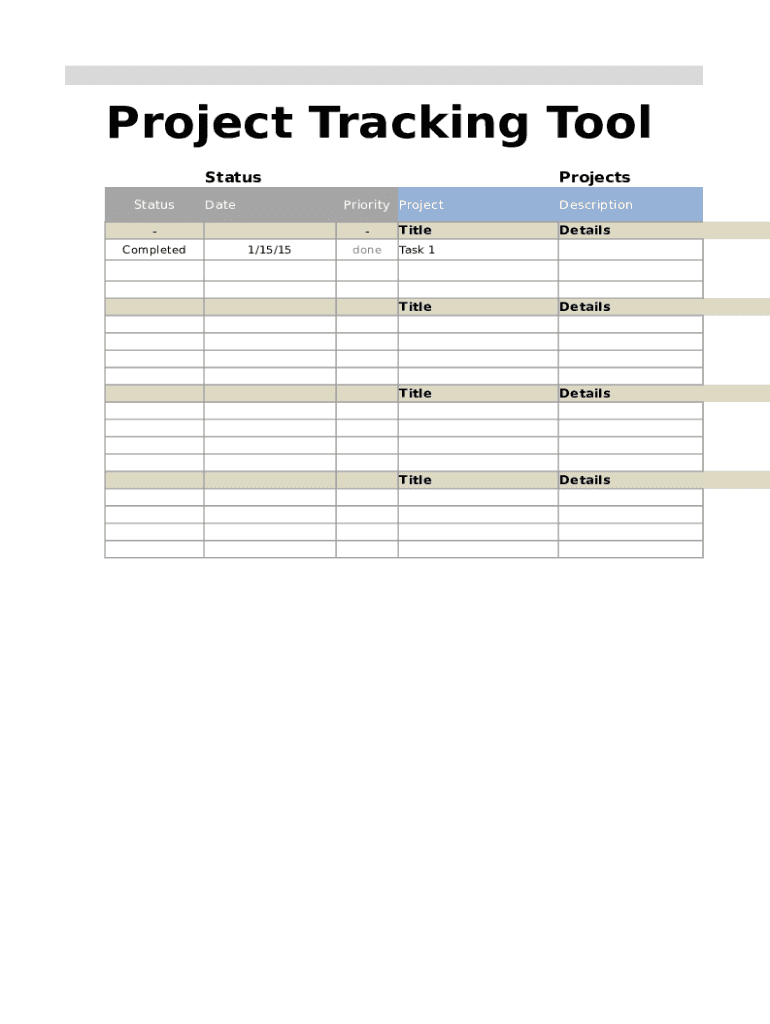
Project Tracking Tool Status StatusDatePriority ProjectCompletedProjects1/15/15TitledoneTask 1Description DetailsTitleDetailsTitleDetailsTitleDetailsDeliverables Deliverable(s)Deadline% Done5/1/2015100%Cost.
Loading

Open form follow the instructions

Easily sign the form with your finger

Send filled & signed form or save
How to fill out the Project Tracker Tool online
The Project Tracker Tool is designed to help users effectively manage and track their projects. This guide will provide you with step-by-step instructions to ensure that you can confidently complete the form online.
Follow the steps to accurately fill out the Project Tracker Tool
- Click the ‘Get Form’ button to obtain the form and open it in the editor.
- In the 'Status' section, indicate the current status of your project by selecting the appropriate option from the dropdown menu. Be sure to keep this information updated as the project progresses.
- Enter the 'Date' when you are filling out the form. This helps in tracking the timeline of your project developments.
- For the 'Priority' field, select the urgency level of the project—high, medium, or low—to help prioritize tasks effectively.
- In the 'Completed Projects' section, record projects that have been finalized. Include the completion date to establish a record of accomplishments.
- Under the 'Title' field, provide a clear title for each task or deliverable. This helps in identifying and organizing tasks better.
- In the 'Description' section, offer detailed information about each task. Be specific about what needs to be done or the objectives of each deliverable.
- In the 'Deliverables' section, list the items or outcomes expected from the project, and set a 'Deadline' for each. Use the '% Done' field to track completion levels.
- In the 'Cost | Hours' section, document any associated costs and estimated hours required. Include fields for 'Fixed Cost', 'Estimated Hours', 'Actual Hours', and 'Billed Hours'. This will assist in budgeting and resource management.
- After completing all sections, save your changes. You can choose to download, print, or share the completed form as needed to keep your stakeholders informed.
Complete your Project Tracker Tool online today to streamline your project management.
Experience a faster way to fill out and sign forms on the web. Access the most extensive library of templates available.
Related content
Project management tools and sample scopes are used to ensure the best quality for...
Wudatime is a free web based project management tool that allows you to easily keep track...
Project management software (PMS) has the capacity to help plan, organize, and manage...
Get answers to your most pressing questions about US Legal Forms API.
How do you track personal projects?
Asana. A hybrid task and project manager, Asana is available for both iOS and Android devices. ... Smartsheet. ... Trello. ... OneNote. ... Do. ... Evernote. ... AgileZen. ... Azendoo.
How do you track project activities?
Start with a project outline. Create deliverables and milestones. Set realistic, clear and measurable goals. Meet regularly with team and stakeholders. Have clear deadlines. Support transparency.
MONITORING PROJECTS
1Monitor project throughout. Monitoring is only useful if it is built into the execution phase at the beginning. ... 2Decide What to measure. It is vital to identify which indicators are to be measured. ... 3Gather the right data. ... 4Select appropriate tools. ... 5Assign monitoring responsibility. ... 6Identify who to report to.
How to Track Project Progress
1Start with a project outline.2Create deliverables and milestones.3Set realistic, clear and measurable goals.4Meet regularly with team and stakeholders.5Have clear deadlines.6Support transparency.
What is the best way to keep track of projects?
Set expectations early. From the beginning, you should let your team or employees know what your expectations for the project are. ... Define scope. ... Follow a template. ... Review progress against a project plan. ... Set time limits. ... Meet frequently. ... Develop an effective filing system. ... Efficiently delegate tasks.
How do you track project project management tool?
Scoro. Scoro is a comprehensive solution that combines all the features you might need in project management software: projects & tasks, contact management, quotes, team collaboration, billing, and reporting. ... ProofHub. ... Basecamp. ... Asana. ... Podio. ... Workzone. ... JIRA. ... Notion.
How do I track many projects?
Stay on top of your task lists per project. ... Book time in your diary each week to review your progress and outstanding work on each project. Use resource management tools if you have access to them. Make time to speak to each project team every week. Know what is a priority and work to that.
How do I track my projects?
Make it a team effort. Everyone on your team wants the same thing: a successful project. ... Establish good goals. You can't track what you haven't established. ... Make the project visible. ... Utilize reporting tools to monitor project progress. ... Check-in with your team regularly.
How do you track project management progress?
Make it a team effort. Everyone on your team wants the same thing: a successful project. ... Establish good goals. ... Make the project visible. ... Utilize reporting tools to monitor project progress. ... Check-in with your team regularly.
How do you keep track of projects and tasks?
Set expectations early. From the beginning, you should let your team or employees know what your expectations for the project are. ... Define scope. ... Follow a template. ... Review progress against a project plan. ... Set time limits. ... Meet frequently. ... Develop an effective filing system. ... Efficiently delegate tasks.
Use professional pre-built templates to fill in and sign documents online faster. Get access to thousands of forms.
If you believe that this page should be taken down, please follow our DMCA take down process here.