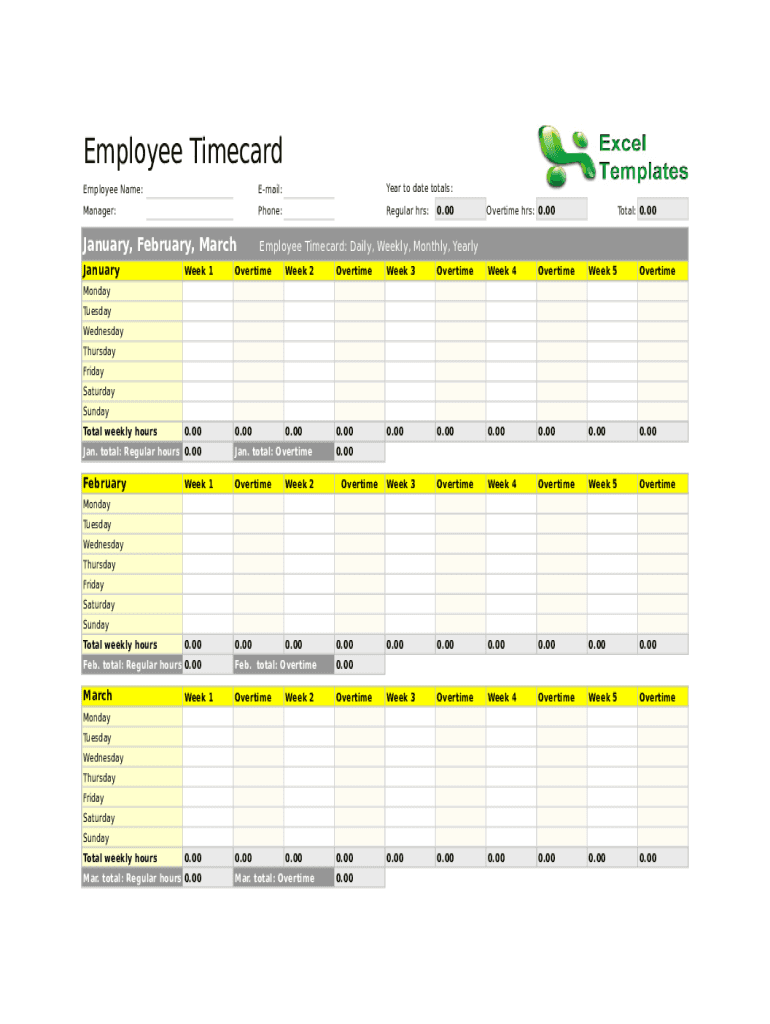
Employee Timecard Employee Name:Email:Year to date totals:Manager:Phone:Regular hrs:January, February, MarchEmployee Timecard: Daily, Weekly, Monthly, YearlyJanuary0.00Overtime hrs: 0.00Total: 0.00Week.

Open form follow the instructions

Easily sign the form with your finger

Send filled & signed form or save
How to fill out the Employee Timecard Spreadsheet online
Completing the Employee Timecard Spreadsheet online is a straightforward process essential for accurate time tracking and payroll management. This guide provides step-by-step instructions to help you navigate each section of the form and ensure all required information is correctly submitted.
Follow the steps to complete your Employee Timecard Spreadsheet online.
- Click ‘Get Form’ button to obtain the form and open it in the editor.
- Fill in your employee name in the designated field at the top of the form. Ensure your name is spelled correctly to avoid processing delays.
- Enter your email address in the corresponding field. This will assist with communication and confirmations related to your timecard.
- Record your year-to-date totals in the specified area. This provides context for your current timecard submission.
- Include the name of your manager and their phone number for reference. This information may be needed for approvals or inquiries.
- Input your regular hours worked in the weekly sections for each designated month. Use the fields labeled Monday through Sunday to detail your daily hours.
- Document any overtime hours in the overtime fields for each week. Be sure to distinguish regular hours from overtime for accurate payroll.
- Calculate the total hours for each week in the provided weekly total section. This ensures correct summation for staff and payroll processing.
- At the end of the month’s section, sum your regular and overtime hours and input these totals in the designated sections.
- Once all fields are completed, review your information for accuracy, then save your changes. You may also download, print, or share the completed form as needed.
Start filling out your Employee Timecard Spreadsheet online today to ensure accurate time tracking and payroll management.
Experience a faster way to fill out and sign forms on the web. Access the most extensive library of templates available.
Related content
Aug 20, 2020 — Below are Timesheet Templates that are available to all state employees...
6, January, February, March Employee Timecard: Daily, Weekly, Monthly, Yearly. 7, January...
Current Practice as Employees Fill out a timecard, then has the Supervisor Review and...
Get answers to your most pressing questions about US Legal Forms API.
How do you make a time card spreadsheet?
Step 1: Format your spreadsheet. To create a spreadsheet that's easy to read, first you need to format. ... Step 2: Title your timesheet. ... Step 3: Add labels to your timesheet. ... Step 4: Add timesheet labels. ... Step 5: Print the timesheet.
How do I calculate my hours worked?
Divide the total amount of your weekly or bi-weekly gross pay by your hourly pay rate. The result is the number of hours you worked during the pay period.
How do you calculate payroll time?
Convert all start and end times to 24-hour format. Take end time and subtract it by start time for each time card to get time duration. Convert from clock time format to decimal number format by dividing the minutes worked by 60 and adding the fraction to whole hours (eg.
How do I make a timesheet in Google Sheets?
0:00 3:30 Suggested clip Create an Employee Timesheet Using Google Sheets - YouTubeYouTubeStart of suggested clipEnd of suggested clip Create an Employee Timesheet Using Google Sheets - YouTube
How are employees timesheets calculated?
Convert all times to 24 hour clock (military time): Convert 8:45 am to 08:45 hours. ... Next, Subtract the start time from the end time. Now you have the actual hours and minutes worked for the day. Finally to determined total wage, you will need to convert this to a decimal format.
How do you create a punch card in Excel?
Click the Insert tab. Click the Shapes button on the ribbon and click the first shape under Rectangles. When the cursor changes to a plus sign, draw a square in the first punch-in slot on the time card. Make sure the square is large enough to accommodate the punch from the machine's pin.
How are payroll and timesheets calculated?
Convert all times to 24 hour clock (military time): Convert 8:45 am to 08:45 hours. ... Next, Subtract the start time from the end time. Now you have the actual hours and minutes worked for the day. Finally to determined total wage, you will need to convert this to a decimal format.
How do I make a time card in Google Sheets?
0:00 3:30 Suggested clip Create an Employee Timesheet Using Google Sheets - YouTubeYouTubeStart of suggested clipEnd of suggested clip Create an Employee Timesheet Using Google Sheets - YouTube
How do I create a timesheet for employees in Excel?
Step 1: Format your spreadsheet. To create a spreadsheet that's easy to read, first you need to format. ... Step 2: Title your timesheet. ... Step 3: Add labels to your timesheet. ... Step 4: Add timesheet labels. ... Step 5: Print the timesheet.
How do you calculate payroll hours for employees?
You do this by dividing the minutes worked by 60. You then have the hours and minutes in numerical form, which you can multiply by the wage rate. For example, if your employee works 38 hours and 27 minutes this week, you divide 27 by 60. This gives you 0.45, for a total of 38.45 hours.
Use professional pre-built templates to fill in and sign documents online faster. Get access to thousands of forms.
If you believe that this page should be taken down, please follow our DMCA take down process here.