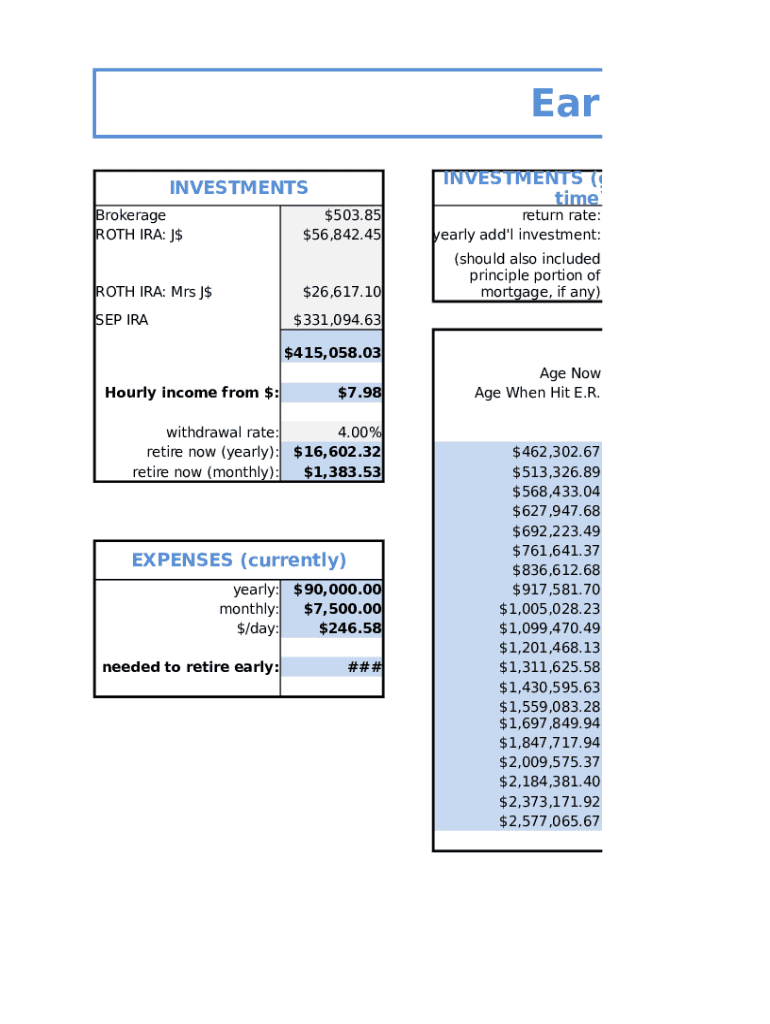
Early Retire INVESTMENTS Brokerage ROTH IRA: J$ROTH IRA: Mrs J$ SEP IRAINVESTMENTS (growth over time)$503.85 $56,842.45return rate: yearly add 'l investment:$26,617.10(should also included principle.
Loading

Open form follow the instructions

Easily sign the form with your finger

Send filled & signed form or save
How to fill out the After-Tax Income online
Filling out the After-Tax Income form online can seem daunting, but with this guide, you will navigate the process with confidence. Understanding each section and its components will help ensure that you complete the form accurately and efficiently.
Follow the steps to successfully complete the After-Tax Income form online.
- Press the ‘Get Form’ button to obtain the After-Tax Income form and open it in your browser.
- Begin by entering your total After-Tax Income, which includes any income sources that have been taxed.
- Next, input your expenses. These should reflect your current monthly and yearly expenditures, including housing, utilities, and any other regular costs.
- Detail your income sources, including brokerage accounts, Roth IRA contributions, and other investments. Be sure to include returns and additional yearly investments as applicable.
- Include any financial goals such as your desired retirement age and the savings rate you are targeting to achieve financial independence.
- When you've completed all fields, review the information for accuracy. Make sure all values are entered correctly to reflect your actual financial situation.
- Finally, save your changes, download the document for your records, print it if necessary, or share it with your financial advisor.
Start your financial planning journey by filling out the After-Tax Income form online today!
Experience a faster way to fill out and sign forms on the web. Access the most extensive library of templates available.
Related content
after-tax means that premiums are deducted after the tax is calculated and deducted. The...
6: Hours and earnings 7: Taxes 8, 9: Before-tax and after-tax deductions 10: Employer-paid...
Net income or earnings after tax or net profit after tax equals sales revenue after...
Get answers to your most pressing questions about US Legal Forms API.
Is after tax income net income?
For an individual, net income is the “take-home” money after deductions for taxes, health insurance and retirement contributions.
What is after tax income on 1040?
Most individual tax filers use some version of the IRS Form 1040 to calculate their taxable income, income tax due, and after-tax income. 1 To calculate after-tax income, the deductions are subtracted from gross income. The difference is the taxable income, on which income taxes are due.
What is considered after-tax income?
After-tax income is the net amount of income available to invest, save, or consume after federal, state, and withholding taxes have been applied—your disposable income.
What is after-tax income vs before tax income?
Both pre-tax and post-tax benefits have their pros and cons. Generally, pre-tax deductions provide an immediate tax break but impact an employee's taxable income, while post-tax deductions don't provide immediate tax relief but won't be taxed when benefits are used in the future.
Use professional pre-built templates to fill in and sign documents online faster. Get access to thousands of forms.
If you believe that this page should be taken down, please follow our DMCA take down process here.