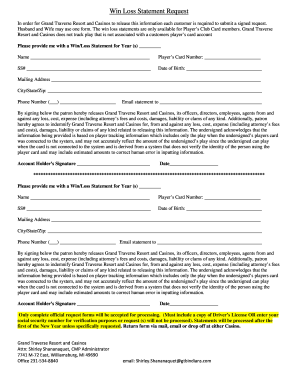
Get Mi Leelanau Sands Casino & Lodge Win Loss Statement Request
How it works
-

Open form follow the instructions
-

Easily sign the form with your finger
-

Send filled & signed form or save
How to fill out and sign MI Leelanau Sands Casino & Lodge Win Loss Statement Request online?
Get your online template and fill it in using progressive features. Enjoy smart fillable fields and interactivity.Follow the simple instructions below:The era of handling worrisome intricate legal and tax documents has passed. With US Legal Forms, the entire process of generating official documents is stress-free. A robust editor is readily available at your command, providing you with numerous useful tools for completing a MI Leelanau Sands Casino & Lodge Win Loss Statement Request. The following advice, together with the editor, will help you through the entire process.
There are several ways to receive the document: as an email attachment, through the mail as a physical copy, or as an instant download. We simplify the process of completing any MI Leelanau Sands Casino & Lodge Win Loss Statement Request. Try it today!
- Click the orange Get Form button to start improving.
- Activate the Wizard mode on the upper toolbar for additional guidance.
- Complete every fillable section.
- Verify that the information you enter in MI Leelanau Sands Casino & Lodge Win Loss Statement Request is current and accurate.
- Specify the date on the document using the Date tool.
- Press the Sign button to create a signature. You have three available options: typing, drawing, or uploading one.
- Ensure all fields are correctly filled in.
- Click Done in the top right corner to save the form.
Tips on how to fill out, edit and sign MI Leelanau Sands Casino & Lodge Win Loss Statement Request online
How to fill out and sign MI Leelanau Sands Casino & Lodge Win Loss Statement Request online?
Get your online template and fill it in using progressive features. Enjoy smart fillable fields and interactivity.Follow the simple instructions below:
The era of handling worrisome intricate legal and tax documents has passed. With US Legal Forms, the entire process of generating official documents is stress-free. A robust editor is readily available at your command, providing you with numerous useful tools for completing a MI Leelanau Sands Casino & Lodge Win Loss Statement Request. The following advice, together with the editor, will help you through the entire process.
There are several ways to receive the document: as an email attachment, through the mail as a physical copy, or as an instant download. We simplify the process of completing any MI Leelanau Sands Casino & Lodge Win Loss Statement Request. Try it today!
- Click the orange Get Form button to start improving.
- Activate the Wizard mode on the upper toolbar for additional guidance.
- Complete every fillable section.
- Verify that the information you enter in MI Leelanau Sands Casino & Lodge Win Loss Statement Request is current and accurate.
- Specify the date on the document using the Date tool.
- Press the Sign button to create a signature. You have three available options: typing, drawing, or uploading one.
- Ensure all fields are correctly filled in.
- Click Done in the top right corner to save the form.
How to Change Get MI Leelanau Sands Casino & Lodge Win Loss Statement Request: Personalize Forms Online
Eliminate the clutter from your document management routine. Uncover the simplest method to locate, modify, and submit a Get MI Leelanau Sands Casino & Lodge Win Loss Statement Request.
The task of preparing a Get MI Leelanau Sands Casino & Lodge Win Loss Statement Request necessitates precision and concentration, particularly from individuals who are not very familiar with this type of work. It is crucial to identify an appropriate template and accurately populate it with the necessary details. With the right solution for managing documents, you can have all the tools readily available. You can easily optimize your editing process without acquiring new skills. Find the correct example of the Get MI Leelanau Sands Casino & Lodge Win Loss Statement Request and complete it right away without toggling between your browser tabs. Explore additional tools to personalize your Get MI Leelanau Sands Casino & Lodge Win Loss Statement Request form in the editing mode.
While on the Get MI Leelanau Sands Casino & Lodge Win Loss Statement Request page, simply click the Get form button to initiate modifications. Input your information into the form immediately, as all required tools are available here. The template is pre-made, so the effort needed from the user is minimal. Just utilize the interactive fillable areas in the editor to quickly finish your documentation. Click on the form and enter the editor mode instantly. Complete the interactive field, and your form is ready.
Experiment with more tools to customize your form:
Often, a minor mistake can ruin the entire form when filled out manually. Eliminate errors in your documents. Quickly find the templates you need and fill them out electronically using an efficient editing solution.
- Surround the document with additional text if necessary. Utilize the Text and Text Box tools to add text in a separate box.
- Incorporate pre-designed graphic elements such as Circle, Cross, and Check using the corresponding tools.
- If required, take or upload images to the document with the Image tool.
- If you wish to draw something in the document, make use of Line, Arrow, and Draw tools.
- Utilize the Highlight, Erase, and Blackout tools to modify the text in the document.
- If you need to add remarks to certain parts of the document, click the Sticky tool and position a note wherever you want.
After buying out his partners, Adelson shut it down to build a brand new resort. On November 26, 1996, the Sands was imploded and demolished, and The Venetian built in its place.