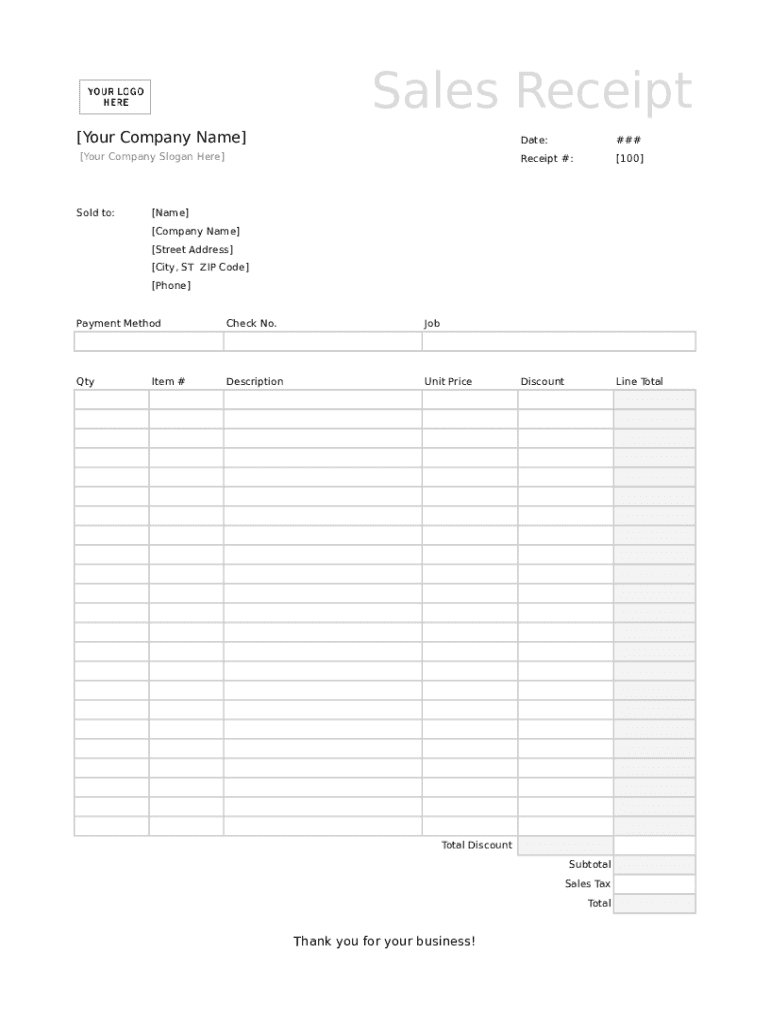
Sales Receipt Your Company Name Date:### Your Company Slogan Here Receipt #: 100 DiscountLine TotalSold to: Name Company Name Street Address City, ST ZIP Code Phone Payment MethodCheck No.JobQtyDescriptionUnit.

Open form follow the instructions

Easily sign the form with your finger

Send filled & signed form or save
How to fill out the Printable Sales Receipt Excel online
The Printable Sales Receipt Excel is a vital document for businesses to record transactions and provide proof of purchase to customers. This guide will walk you through each section of the form, ensuring you can fill it out accurately and efficiently.
Follow the steps to complete your sales receipt form with ease.
- Click ‘Get Form’ button to obtain the form and open it in the editor.
- Enter your company name in the designated field at the top of the form. This ensures the receipt is accurately attributed to your business.
- Fill in the date of the transaction. This should be the date on which the sale occurred.
- Input your company slogan, if applicable, in the provided space to give a personal touch to the receipt.
- Assign a unique receipt number in the 'Receipt #' field to help with record keeping and tracking.
- List the customer information in the 'Sold to:' section, including the name, company name, street address, city, state abbreviation, ZIP code, and phone number.
- Specify the payment method used for the transaction in the 'Payment Method' section.
- If applicable, include the check number in the 'Check No.' field.
- Provide details regarding the job or service provided in the 'Job' field.
- For each item sold, list the quantity, description, unit price, and item number in their respective fields. Ensure accuracy to reflect the transaction correctly.
- Calculate the total discount, subtotal, sales tax, and final total for the transaction. Enter these amounts in their designated fields.
- Review all entered information for accuracy and completeness before proceeding.
- Once the form is complete, you may save your changes, download the receipt, print it out, or share it as needed.
Complete your sales receipt form online today and streamline your transaction process!
Experience a faster way to fill out and sign forms on the web. Access the most extensive library of templates available.
Related content
After approval, Excel spreadsheets must be uploaded through Revenue Online. A sample...
6, Daily Cash Receipt Log. 7. 8, Date Received: 9. 10, Check, Check, Funds, Routed to...
Import an Excel spreadsheet directly into the Address Book. ... appears indicating that...
Get answers to your most pressing questions about US Legal Forms API.
How do I make my own receipt?
Add in your company details (name, address) in From section. Fill out client details (name, email, address) in For section. Write out line items with description, rate and quantity. Finish with the date, invoice number and your personalized brand.
How do I create a digital receipt?
Add in your company details (name, address) in From section. Fill out client details (name, email, address) in For section. Write out line items with description, rate and quantity. Finish with the date, invoice number and your personalized brand.
How do I make an Excel spreadsheet fit to print?
Click Page Layout. ... Select the Page tab in the Page Setup dialog box. Select Fit to under Scaling. To fit your document to print on one page, choose 1 page(s) wide by 1 tall in the Fit to boxes. ... Press OK at the bottom of the Page Setup dialog box.
How do I create a receipt voucher in Excel?
Step #1: Access the templates. There will be an available search tab where you can type what template it is that you are looking for. In this case, type the word receipt. Click Create. After clicking on Create, a ready-made receipt template will appear your Excel sheet.
How do I create a sales spreadsheet in Excel?
Create a new Excel spreadsheet. Create a new spreadsheet. ... Set up how you want to present your chart. ... Choose the format on how you want to display your data. ... Select your chart options. ... Create your chart locations.
How do I write a sales receipt?
Select an existing customer or create a new one. Email field should auto-populate with the customer's email address if it exists in the system. ... Enter any custom field info. Select the sales receipt date. Enter the payment method. Enter the reference number (this can be a check number, online code, etc)
How do I make an Excel spreadsheet a receipt?
Open a Blank Workbook in Excel mobile app. ... Press the small icon that looks like sheet tabs. ... Press the ellipsis to open more options. ... Take picture of receipt (or other document) ... Adjust the Area to be Scanned into Excel. ... Preview of the Scan. ... Example of Receipt Scanned to Excel.
How do I print receipts from Excel?
Creating a receipt is simple. Open an MS Excel worksheet, hover on the File tab and click on 'New'. Look up for 'Receipt'from Office.com Templates. The Excel application will return results showing some or all the samples which exist in the database.
How do you create a receipt in Excel?
Creating a receipt is simple. Open an MS Excel worksheet, hover on the File tab and click on 'New'. Look up for 'Receipt'from Office.com Templates. The Excel application will return results showing some or all the samples which exist in the database.
How do I create a sales receipt in Excel?
Open Microsoft Excel. ... Search for an Invoice Template. ... Choose Your Template. ... Open the Invoice Template. ... Customize the Invoice. ... Save the Invoice. ... Send the Invoice. ... Open Microsoft Excel.
Use professional pre-built templates to fill in and sign documents online faster. Get access to thousands of forms.
If you believe that this page should be taken down, please follow our DMCA take down process here.