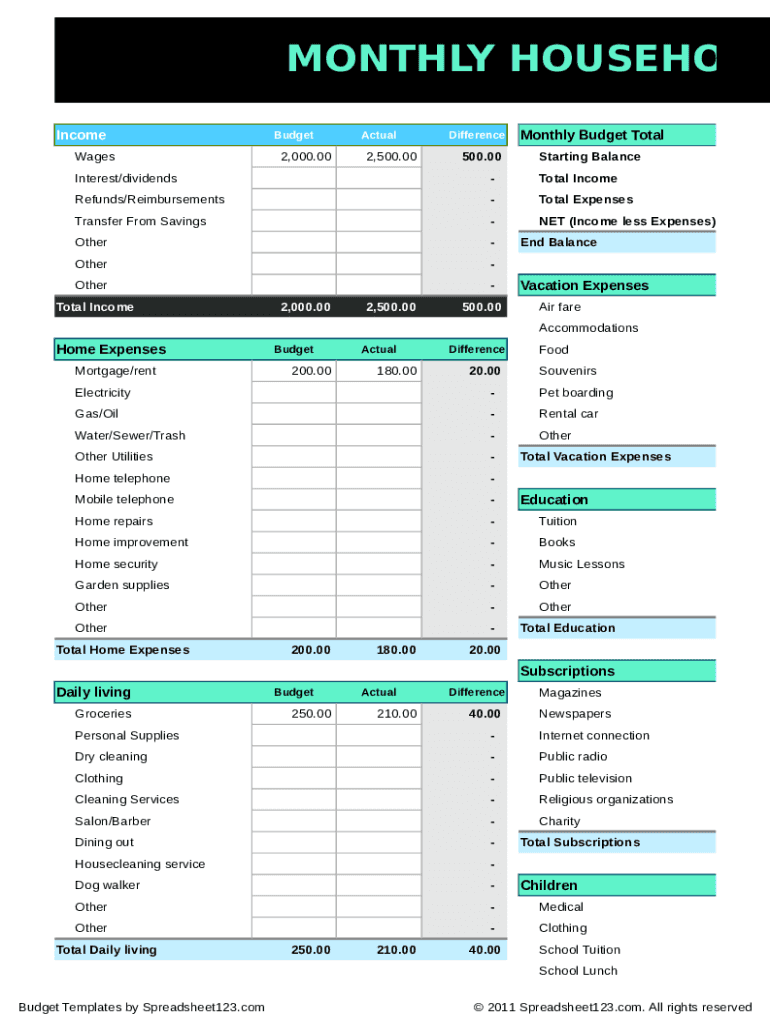
MONTHLY HOUSEHOLD Income WagesBudget2,000.00Actual2,500.00Difference500.00Monthly Budget Total Starting BalanceInterest/dividendsTotal IncomeRefunds/ReimbursementsTotal ExpensesTransfer From SavingsNET.
Loading

Open form follow the instructions

Easily sign the form with your finger

Send filled & signed form or save
How to fill out the Monthly Household Budget Sheet online
Managing your finances is essential for maintaining a stable household. This guide will walk you through the process of filling out the Monthly Household Budget Sheet online, ensuring that you accurately track your income and expenses.
Follow the steps to successfully complete your Monthly Household Budget Sheet
- Click the ‘Get Form’ button to access the Monthly Household Budget Sheet and open it in your preferred editor.
- Begin with the 'Income' section. Here, input your various sources of income, including wages, interest, dividends, and any refunds or reimbursements.
- Next, proceed to the 'Monthly Budget Total' segment. This area helps you calculate your total income by summing up all entries from the 'Income' section.
- Move to the 'Expenses' section, where you will categorize your expenditures. Begin with 'Vacation Expenses,' followed by 'Home Expenses,' detailing costs such as mortgage or rent, utilities, and home repairs.
- Continue with other categories like 'Daily Living Expenses,' 'Transportation Expenses,' and 'Entertainment Expenses.' In each category, input your budgeted amounts, actual expenditures, and calculate the difference.
- In the 'Obligations & Savings' category, record any payments such as credit card bills, savings contributions, and any other obligations.
- After completing all sections, review your entries for accuracy. Ensure that your 'Total Income' matches your 'Total Expenses' to determine your net balance.
- Finally, save your changes, and choose your preferred method to download, print, or share the completed form.
Start filling out your Monthly Household Budget Sheet online today for better financial management.
Experience a faster way to fill out and sign forms on the web. Access the most extensive library of templates available.
Related content
Use this worksheet to see how much money you spend this month. Also, use the worksheet to...
1, Household Budget Worksheet. 2, Enter your estimated monthly income and expenses to...
L_ESLPod_563_Guide ESLPod 563 Guide Reducing Household Expenses ... saving for retirement...
Get answers to your most pressing questions about US Legal Forms API.
What is the 70 20 10 rule money?
The biggest chunk, 70%, goes towards living expenses while 20% goes towards repaying any debt, or to savings if all your debt is covered. The remaining 10% is your 'fun bucket', money set aside for the things you want after your essentials, debt and savings goals are taken care of.
How do I make a personal monthly budget spreadsheet?
Table of Contents Step 1: Open a Google Sheet. Step 2: Create Income and Expense Categories. Step 3: Decide What Budget Period to Use. Step 4: Use simple formulas to minimize your time commitment. Step 5: Input your budget numbers. Step 6: Update your budget. Bonus: How to Automatically Update your Google Sheet Budget.
What are the benefits of the 50 30 20 rule?
The 50-20-30 rule is intended to help individuals manage their after-tax income, primarily to have funds on hand for emergencies and savings for retirement. Every household should prioritize creating an emergency fund in case of job losses, unexpected medical expenses, or any other unforeseen monetary cost.
Does 50 30 20 include 401k?
Important reminder: The 50/30/20 budget rule only considers your take-home pay for the month, so anything automatically deducted from your paycheck — like your work health insurance premium or 401k retirement contribution — doesn't count in the equation.
What is one negative thing about the 50 30 20 rule of budgeting?
Overall, the 50 30 20 rule is a simple guideline for budgeting, but it may not be the right fit for everyone's financial situation. For example, you may have a lot of expenses to pay each month, that take up more than 50% of your monthly income, leaving little to allocate towards "wants" and savings.
What are examples of the 50 30 20 budget rule?
The rule targets 50% of your after-tax income toward necessities, 30% toward things you don't need—but make life a little nicer—and the final 20% toward paying down debt and/or adding to your savings....A 50-30-20 rule example. TOTAL = $2,000, or 50%Mortgage$1,500Groceries$6004 more rows • Mar 23, 2023
How do I make a monthly budget for my household?
How to budget money Calculate your monthly income, pick a budgeting method and monitor your progress. Try the 50/30/20 rule as a simple budgeting framework. Allow up to 50% of your income for needs. Leave 30% of your income for wants. Commit 20% of your income to savings and debt repayment.
What is the 50 20 30 budget rule?
By Melissa Green | Citizens Bank Staff One of the most common percentage-based budgets is the 50/30/20 rule. The idea is to divide your income into three categories, spending 50% on needs, 30% on wants, and 20% on savings.
Use professional pre-built templates to fill in and sign documents online faster. Get access to thousands of forms.
If you believe that this page should be taken down, please follow our DMCA take down process here.