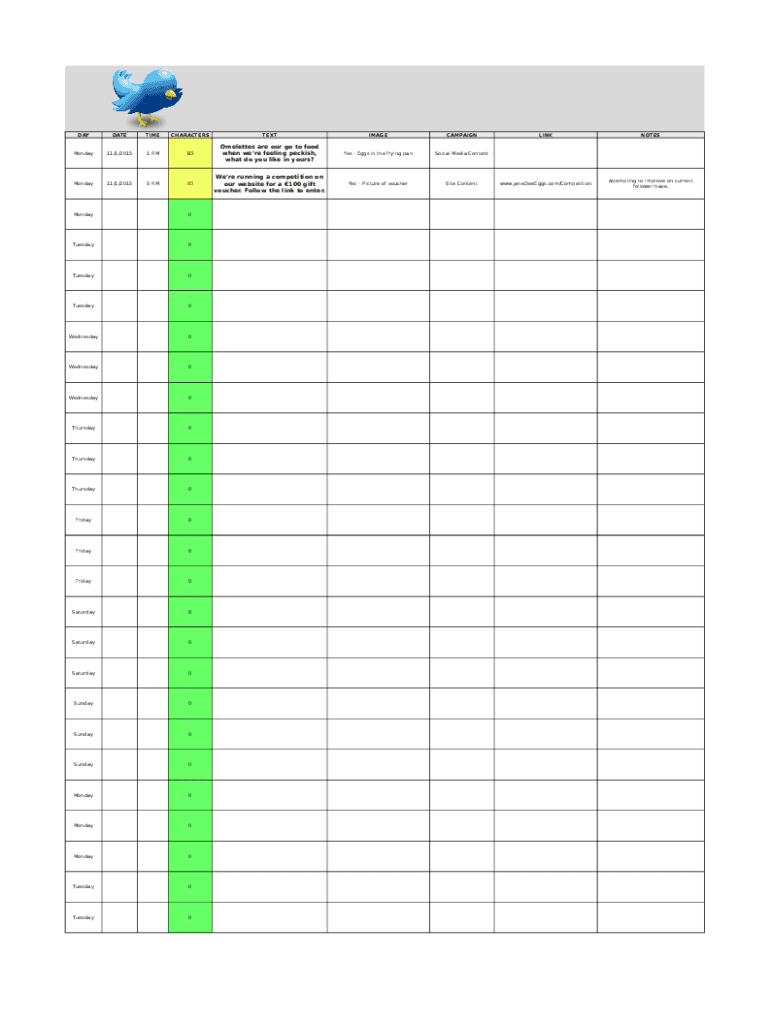
DAYDATETIMECHARACTERSTEXTIMAGECAMPAIGNYes Eggs in the frying panSocial Media ContentYes Picture of voucherSite ContentMonday11/1/20151 P.M83Omelettes are our go to food when we 're feeling peckish, what.
Loading

Open form follow the instructions

Easily sign the form with your finger

Send filled & signed form or save
How to use or fill out the Et 2016 Social Media Calendar online
The Et 2016 Social Media Calendar is a vital tool for planning and managing your social media content effectively. This guide provides step-by-step instructions to help users fill out the form accurately and efficiently, ensuring a strategic approach to social media engagement.
Follow the steps to complete the Et 2016 Social Media Calendar.
- Press the ‘Get Form’ button to access the Et 2016 Social Media Calendar document and open it in your browser.
- Begin with the 'DAY' field. Select the specific day of the week you are planning content for, such as Monday, Tuesday, etc.
- In the 'DATE' field, input the corresponding date for your planned social media posts, ensuring that it corresponds accurately with the day selected.
- Fill in the 'TIME' field with the time you intend to post, utilizing a 12-hour format (e.g., 1 P.M).
- Next, enter the character count in the 'CHARACTERS' section to ensure your post aligns with platform requirements.
- In the 'TEXT' field, write the main content of your social media post, focusing on engagement and clarity.
- Identify any specific campaign related to your post in the 'CAMPAIGN' section, which helps categorize your content.
- Utilize the 'LINK' field to input any URLs associated with your social media content, guiding users to additional information or promotions.
- Lastly, in the 'NOTES' section, jot down any relevant observations or strategies that could assist in enhancing your social media posts.
Complete your documents online to streamline your social media management process.
Experience a faster way to fill out and sign forms on the web. Access the most extensive library of templates available.
Related content
Oct 24, 2016 — A calendar that is quickly updated, helps keep deadlines and is flexible...
Jun 3, 2016 — media audit, an editorial calendar, a social media strategy and tactical...
February 29, also known as leap day or leap year day, is a date added to leap years. A...
Get answers to your most pressing questions about US Legal Forms API.
How do I create a social media calendar plan?
6 tips to create and manage a social media content calendar Identify your social media channels. ... Conduct an audit of your social platforms. ... Decide what you want to track with your social media content calendar. ... Plan your posting cadence. ... Build out a review schedule. ... Track and report on published content.
Does buffer have a social media calendar?
We've got you covered in Buffer on the how of planning and creating content. We've also recently updated our app's built-in calendar to help you draft, preview, schedule, and publish all of your social media posts without having to leave the app.
What is social media calendar template?
A social media content calendar template is a framework that helps you plan and track your social media posts. Asana's free social media content calendar template makes it easier to collaborate with cross-functional teams and plan out upcoming social media campaigns.
What does a good social media calendar look like?
To get the most value out of your social media calendar, it may include the following: The date and time a post will go live. The social media account or network each post will go live on. Materials to include, such as copy, hashtags, links, and graphics.
How do I create a social media calendar in Excel?
How to create a social media content calendar template in Excel Step 1: Start your template. First, head to Excel and start a blank template. ... Step 2: Date and Day. ... Step 3: Post Topic. ... Step 4: Image. ... Step 5: Content Pillar. ... Step 6: Platform.
What is a calendar schedule for social media?
How to create a social media calendar in 5 steps Choose your post types and formats. ... Establish your posting frequency. ... Choose the relevant platforms for you. ... Collaborate, give feedback and approve posts. ... Schedule, track and monitor your posts. ... Planable: social media scheduling, organization and planning.
What is content calendar in social media marketing?
A content calendar (also known as an “editorial calendar”) is a written schedule of when and where you plan to publish upcoming content. Content calendars typically include upcoming pieces, status updates, planned promotional activity, partnerships, and updates to existing content.
How do I create a social media calendar yearly?
But no matter where you're building your social media calendar, follow this six-step guide to get started: Identify your social media channels. ... Conduct an audit of your social platforms. ... Decide what you want to track with your social media content calendar. ... Plan your posting cadence. ... Build out a review schedule.
Use professional pre-built templates to fill in and sign documents online faster. Get access to thousands of forms.
If you believe that this page should be taken down, please follow our DMCA take down process here.