Loading
Get Car Mileage Tax Calculator
How it works
-

Open form follow the instructions
-

Easily sign the form with your finger
-

Send filled & signed form or save
How to fill out the Car Mileage Tax Calculator online
The Car Mileage Tax Calculator is a valuable tool that assists users in estimating their mileage expenses for tax purposes. This guide will walk you through the process of filling out the form online, ensuring you provide all necessary information accurately.
Follow the steps to complete the Car Mileage Tax Calculator online
- Press the ‘Get Form’ button to access the Car Mileage Tax Calculator form and open it in the editor.
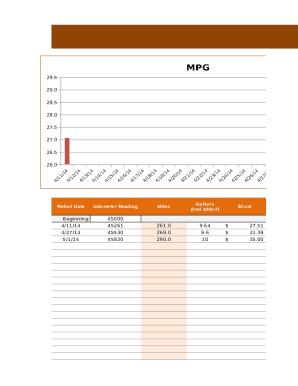
- Enter your beginning odometer reading in the designated field to provide a starting point for your mileage calculations.
- For each fuel refill, fill in the corresponding date, odometer reading after refueling, the gallons of fuel added, and the cost of that fuel. Ensure all figures are accurate to reflect true usage.
- Review the ‘Cost per Mile’ section to see your estimated costs based on the entered data. This calculates the cost per mile driven.
- Once all information is filled in, review the entire form for accuracy. Make any necessary corrections.
- After completing the form, you can save your changes, download the document, print a hard copy, or share the form as needed.
Start completing your documents online with ease today!
For 2019 tax filings, the self-employed can claim a 58-cent deduction per business mile. Those miles could be racked up from meetings with clients, travel to secondary work sites or errands to pick up supplies.