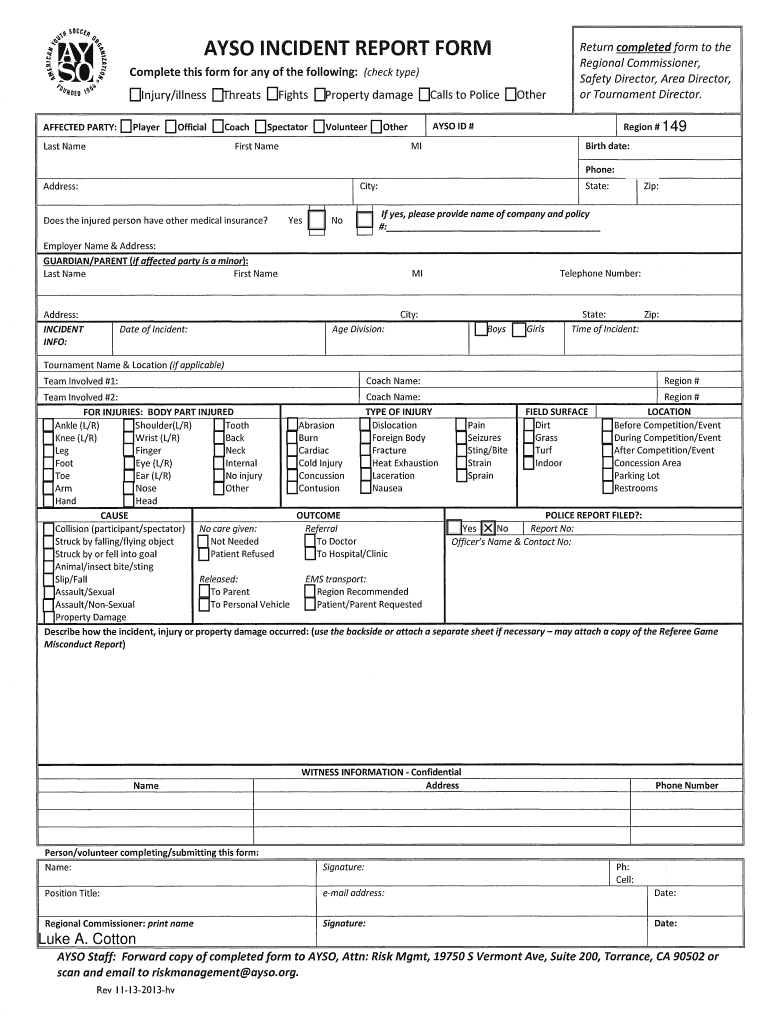
SDCCt ,,.,.AVSO INCIDENT REPORT FORMf 'l '.Jl ;;; r; ..Return completed form to the Regional Commissioner, Safety Director, Area Director, or Tournament Director.Complete this form for any.

Open form follow the instructions

Easily sign the form with your finger

Send filled & signed form or save
How to fill out the AYSO Incident Report Form online
The AYSO Incident Report Form serves as a critical document for reporting personal injuries, property damage, or threats related to AYSO events. This guide will provide you with step-by-step instructions on how to accurately complete the form online.
Follow the steps to successfully complete the AYSO Incident Report Form.
- Click ‘Get Form’ button to access the AYSO Incident Report Form and open it in the editor.
- Begin by checking the type of incident that occurred. You can select from options such as injury/illness, threats, fights, property damage, calls to police, or other incidents.
- Fill in the affected party's details by entering their last name, first name, birth date, phone number, city, address, and zip code. Ensure all information is correct and complete.
- Indicate whether the injured person has other medical insurance. If yes, provide the company name and policy number.
- If the affected party is a minor, fill out the guardian or parent’s information, including their last name, first name, address, and telephone number.
- Input the date and time of the incident, including the age division and the tournament name and location, if applicable.
- Document the teams involved in the incident and specify any injuries by selecting the body parts affected.
- Detail the cause of the incident, indicating whether it was a collision, slip/fall, or another reason.
- Select the type of injury sustained and provide the outcome, including whether the person was referred to a doctor or hospital.
- Record the field surface and the specific location where the incident occurred.
- Indicate whether a police report was filed and, if so, provide the report number and officer's contact information.
- Provide a detailed description of the incident, including how it occurred, and attach additional pages if necessary.
- Fill in the witness information, ensuring to include their address and contact number.
- Complete the form by signing it with your name, position title, email address, and date. Ensure all required fields are filled.
- Once completed, save your changes, download, print, or share the form as needed.
Get started with completing the AYSO Incident Report Form online today.
Experience a faster way to fill out and sign forms on the web. Access the most extensive library of templates available.
Related content
by J Saul · 2007 · Cited by 57 · Related articlesProcedures is a publication...
Please utilize and submit the Recruitment Authorization Form (RAF), also known ... Event...
Use professional pre-built templates to fill in and sign documents online faster. Get access to thousands of forms.
If you believe that this page should be taken down, please follow our DMCA take down process here.
This form is available in several versions. Select the version you need from the drop-down list below.